
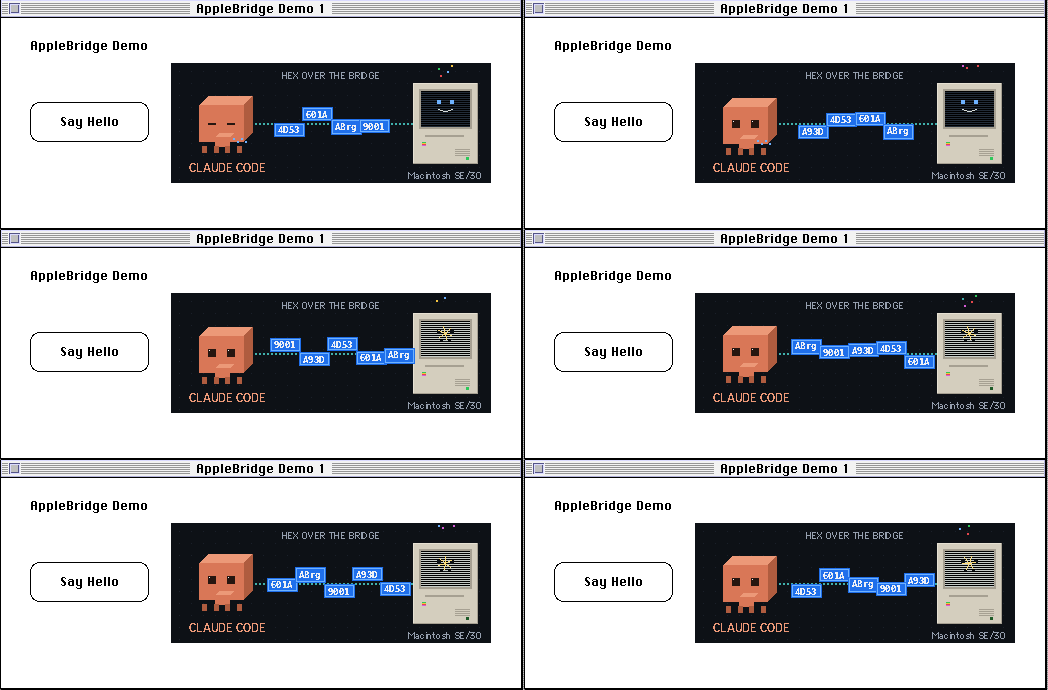
Symantec Visual Architect (1994, part of Symantec C++ 7) is a first-generation GUI builder: you draw the interface, wire commands in dialogs, and a generator writes C++ classes for the THINK Class Library. The question behind this experiment: does that workflow survive complete remote control — from an empty project to a running application, without a hand on the guest’s mouse or keyboard, and with one demand the generator cannot meet by itself: a live animation playing inside the generated window?
The answer is yes — with findings that sit exactly where Visual Architect differs from the system’s other tools. The short version: a 1994 GUI builder carries a full remote-controlled workflow all the way to a running application — but which input layer a given tool reads (the event queue, the hardware mouse, or the raw keyboard) cannot be seen from the outside, only measured; and past the generator’s limit it pays off that the bridge can write source code rather than merely press buttons. The complete run is documented below in seven segments, recorded uncut from the emulator’s display.
The setup
The guest is System 7.6.1 inside Basilisk II; control runs over the AppleBridge: a daemon in the guest accepts commands over TCP (write files, inject keystrokes, launch applications), and for everything a modal tracking loop swallows, the host drives the real mouse across the emulator window (coordinates map 1:1 from a framebuffer screenshot). Every look at the screen is a framebuffer export from the emulator process — 20 to 40 ms per frame, with zero load on the bridge.
The goal: a project SayHello.π, a window holding the static text AppleBridge Demo, a Say Hello button — and next to the button the 16-frame animation from the ClaudeApp project (320×120 pixels, PackBits-packed Gfrm resources sharing one clut), played by a THINK Class Library idle chore. The button’s alert: Hello from AppleBridge! Built by remote control.
Segment 1 — The project
The THINK Project Manager cold-starts into a modal Open dialog; New leads to the model picker, with “Visual Architect Project” preselected. The project name is typed into the Standard File dialog — synthetic keystrokes land here, because this dialog reads the event queue.
Right after creation, and before Visual Architect’s first launch, the animation resources were merged into the project template over the bridge: Rez -a about_inline.r -o "Project Resources.rsrc" — 91 KB of packed frames, executed by ToolServer, verified by file growth (13 KB → 105 KB). At this point no program holds the project resources open; later the window for this gets smaller.
Segment 2 — Window and button
Visual Architect opens via LAUNCH with a document parameter, straight onto the project’s resource file. View → View Info… exposes the window parameters: width 520, height 210, the title, and the checkboxes for scroll bars and size box — all deselected for a demo window. Then: clear the template (⌘X deletes panes; Clear does not), pick the button tool from the tear-off palette, draw the button with one slow drag — and typing immediately sets its title.
Two findings from this dialog, both reproduced deterministically: its text fields focus only via Tab (clicks are ignored), and bursts of synthetic typing lose characters in Visual Architect dialogs — “AppleBridge Demo” arrived twice, identically, as “ppleBridgeDemo”. Individual synthetic keystrokes land completely. Whoever types into VA dialogs by remote control types character by character.
Segment 3 — The static text
The text tool (second column of the palette) draws a text box with the same slow drag and leaves a blinking insertion point. Here the reach of synthetic input ends entirely: Visual Architect’s in-view text editor accepts neither typed bursts nor individual synthetic keystrokes — only the host’s real keyboard (via cliclick into the activated emulator window) produces characters. The same class of tool that accepted synthetic events for the button title evidently reads past the event queue here.
Segment 4 — The command
Edit → Commands…, ⌘K creates a command: cmdSayHello (number 512, assigned automatically), the In-Class popup set to CMain, the Do popup set to Call. The button then gets its Command popup under CButton in the Pane Info dialog pointed at cmdSayHello. Popups are press-drag-release in a single gesture, and an item’s position must be known in advance — but a briefly held popup can be read off a framebuffer screenshot, because the local export still answers while the tracking loop starves the daemon.
Segment 5 — Saving, and the first build
The known stumbling block from the trial run, deliberately left in the picture: from Visual Architect’s point of view a freshly created project has never been saved, and Generate warns — misleadingly — that the “wrong” project file is open. The way out is a build attempt (⌘U in the Project Manager): it saves the project, the full TCL build spins up (150 files, a good 90 seconds), and afterwards Visual Architect generates without complaint.
Segment 6 — Generate All
With the resource document open in the browser, Generate All writes fifteen source files: the x_ classes (rewritten on every Generate), the once-only user classes, and the command dispatch — x_CMain::DoCommand routes cmdSayHello to an empty virtual method that the user class overrides.
The intervention: animation as an idle chore
The generator delivers the scaffold; the rest is ordinary TCL programming, written over the bridge into CMain.cp/CMain.h (the “only generated once” files that a repeated Generate leaves untouched). The handler is two lines (ParamText + NoteAlert(128) — the generic alert lives in the project resources). The animation:
- A
CChoresubclass is registered viagApplication->AssignIdleChore()(the declarationextern CApplication *gApplication;you write yourself, following the generated code’s example). Perform(long *maxSleep)unpacks oneGfrmframe per tick withUnpackBitsinto a hand-built 8-bit off-screenPixMap(pmTable= theclut,rowByteswith its high bit set) and blits it next to the button withCopyBits.*maxSleepis trimmed to the frame delay — soWaitNextEventwakes the application in time while still yielding to background processes.- The trap: drawing into the window port from a chore inherits the origin and clip of whichever pane was prepared last — visible as a single stripe of the animation.
itsWindow->Prepare()does not help either, because TCL caches the prepared view (cPreparedView). What is reliable is raw QuickDraw:SetPort+SetOrigin(0,0)+ClipRect(&portRect), followed byCView::ForceNextPrepare()so TCL stops trusting its cache.
Two operational findings on the side: Run in the Project Manager was a silent no-op — menu, ⌘R and the real keyboard alike; a 25-frame framebuffer burst showed zero changed pixels. The most plausible cause is the 600 KB default partition, which does not fit TCL plus 130 KB of animation data. The reliable route is Build Application… plus a launch over the bridge. And because the path to the partition dialog proved to be a misoperation trap of its own, the finished application’s SIZE resource was patched directly: DeRez -only 'SIZE', values raised to 1.5 MB, Rez -a back in — to be repeated after every Build Application.
Segment 7 — The application
launch_app starts the built SayHello over the bridge. The window carries the title set in View Info, the animation runs next to the button, clicking Say Hello raises the alert — and the animation keeps running behind the alert, because the chore hangs off the application’s idle time, not off the window’s contents.
What separates this from a click recorder
Three things distinguish this run from a script replaying clicks. First, verification against artifacts: every Generate checked against the file listing, every compile against the code size in the project window, every resource intervention via DeRez — never against the goodwill of a status message. Second, the division of labor between input paths: synthetic events where a queue is read; the real mouse where a tracking loop polls hardware; the real keyboard where an editor ignores both — which layer a 1994 tool reads cannot be seen from the outside and is settled only by measurement. Third, the generator’s limit: Visual Architect produces interface and dispatch, but no behavior — the step from a clickable mock-up to a live animation is handwork inside the generated scaffold, and exactly there it pays off that the bridge can write source code instead of merely pressing buttons.
Sources
- The run itself, on the guest (System 7.6.1 in Basilisk II, Symantec C++ 7 / Visual Architect / TCL 2.0), 2026-08-31 — the seven uncut screen recordings above
- AppleBridge:
mcp/tools.py(mac_write_file,launch_app,mpw_execute),host/guest_input.py(real mouse/keyboard),host/fb_export.py(framebuffer export) - Animation pipeline:
host/tools/gif_to_rez.pyandmac/claudeapp/main.c(reference implementation of theGfrmplayer) - Foundation article of this series: C für den klassischen Macintosh: MPW und THINK C in der Praxis