
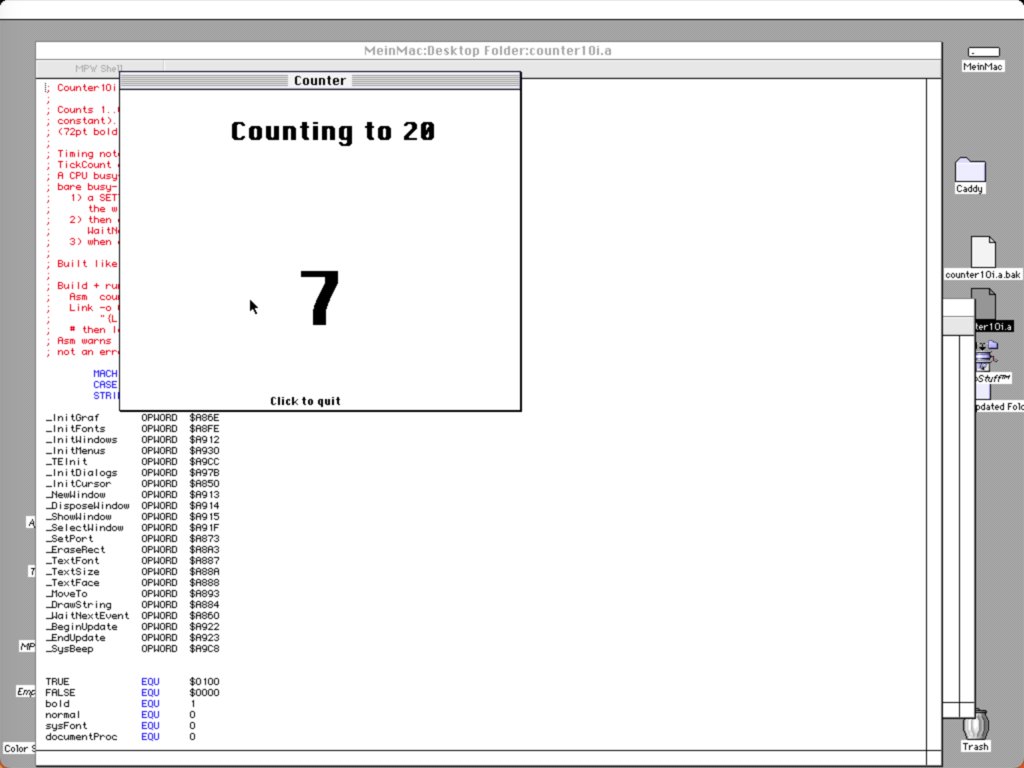
A Macintosh application written in 68K assembly is not a stripped-down version of a C application. It is the same application with the compiler’s work done by hand: the stack frame, the calling convention, the QuickDraw globals, the entry point — all of it becomes source you have to write and get right. This article walks the complete implementation of one such program, line by line, and shows it running.
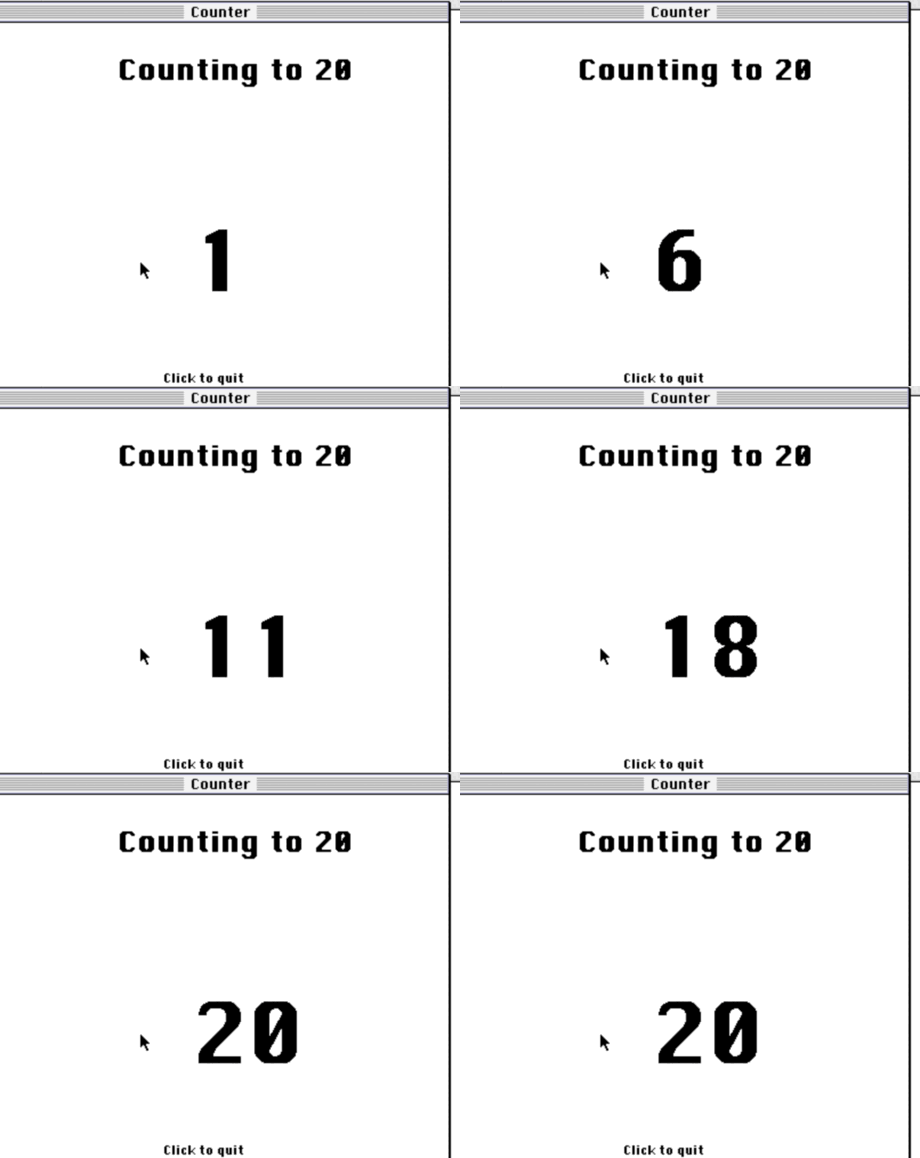
The subject is Counter10i: 275 lines of MPW assembly that open a window on System 7.6.1, count from 1 to 20 with a beep and a 72-point digit per step, and quit on a mouse click. It was written, assembled, linked and launched on the emulated guest over the AppleBridge link — every command below was actually executed, and the recording further down is of that binary running.
The program is deliberately small, but it is not a toy: it opens a real window, honours update events, coexists with a background service under cooperative multitasking, and terminates cleanly. Those four properties are what separate a Macintosh application from a computation that happens to run.
The problem that shaped the design
The first version of this program did not work, and the reason is worth stating before any code: under emulation, the obvious ways to wait do not wait.
A classic Mac program paces itself with the tick counter — 60 ticks to the second, read via TickCount or slept through with _Delay or the sleep parameter of WaitNextEvent. All three are defined in terms of the emulated clock, and Basilisk II advances that clock as fast as it can retire instructions. A request to wait sixty ticks is satisfied in very close to zero wall-clock time.
| Mechanism | Waits in emulated time | Waits in wall-clock time |
|---|---|---|
_Delay (tick count) | yes | no — returns effectively at once |
WaitNextEvent sleep parameter | yes | no |
TickCount deadline loop | yes | no |
CPU busy-loop (SUBQ/BNE) | — | yes — the host must execute the instructions |
Only the last one costs real time, because the host CPU genuinely has to emulate every iteration. So the pacing is a busy-loop.
That fix creates the second problem. A bare busy-loop never yields, and System 7 is cooperatively multitasked: a program that does not call WaitNextEvent starves everything else on the machine. In an earlier revision the consequence was immediate and visible — the application never even came to the foreground, because the Process Manager had no opportunity to bring it there, and the AppleBridge daemon in the background stopped answering.
The design that resolves both is a three-phase main loop:
| Phase | What runs | Purpose |
|---|---|---|
| Settle | 30 passes of pure WaitNextEvent | let the Process Manager foreground the app and paint the window |
| Count | per step: 40 chunks of 750 000 busy iterations, each preceded by a WaitNextEvent | pace at roughly one second per number while still yielding |
| Idle | plain WaitNextEvent, no burning | stop consuming the host CPU once counting is done |
The chunking is the whole trick. The program burns host time in small slices and returns to the event loop between each one, so it is simultaneously slow enough to watch and polite enough to leave the machine usable.
Step 1 — Declaring the Toolbox without interface files
The program calls twenty-two Toolbox routines and includes no interface file for any of them. Each is declared directly as the A-line trap word it actually is:
_InitGraf       OPWORD  $A86E
_InitWindows    OPWORD  $A912
_NewWindow      OPWORD  $A913
_WaitNextEvent  OPWORD  $A860
_DrawString     OPWORD  $A884
_SysBeep        OPWORD  $A9C8
OPWORD defines a mnemonic that assembles to a literal instruction word. On a 68K Macintosh a Toolbox call is an illegal instruction in the $Axxx range; the processor traps, and the Trap Manager dispatches to the ROM routine at that index. Writing _NewWindow in the source therefore emits exactly one word, $A913, and nothing else — there is no glue, no stub, no library import.
This is not merely a size optimisation. It removes the dependency on Traps.a and the interface files entirely, which matters on a guest whose MPW installation may have a stale {CIncludes}. The cost is that the trap numbers must be correct, and a wrong one fails at run time rather than at assembly time.
Three directives set the dialect for everything that follows:
        MACHINE MC68020
        CASE    OBJECT
        STRING  PASCAL
STRING PASCAL is the consequential one: it makes every DC.B 'text' emit a length-prefixed Pascal string rather than a bare byte sequence. That is why the program can pass PEA WTitle straight to _NewWindow and PEA HdrText straight to _DrawString — the Toolbox expects StringPtr, and the assembler has already laid the length byte down.
Step 2 — Where the data lives, and why it is inside the code
main            PROC    EXPORT
        BRA.S   StartCode

WTitle          DC.B    'Counter'
                DS.W    0
HdrText         DC.B    'Counting to 20'
                DS.W    0
ExitText        DC.B    'Click to quit'
                DS.W    0
NumStr          DC.B    '   '
                DS.W    0
BoundsRect      DC.W    90,120,410,520

StartCode:
The strings and the window rectangle sit inside the code segment, jumped over by a two-byte branch, rather than in a data segment where they conceptually belong. This is deliberate and it is the single most common way a first assembly application fails to link.
Global data outside the procedure lands in the A5 world, and initialising the A5 world is the job of _DataInit, a runtime routine the linker expects to find. Omit it and the link fails; provide it incorrectly and the program launches into garbage. Placing the data in the code segment sidesteps the question completely: the bytes are part of the CODE resource, addressed PC-relative, and require no initialisation at all.
Each DS.W 0 after a string is an alignment directive, not a reservation. 'Counter' is eight bytes with its length prefix — even — but 'Counting to 20' is fifteen, and a DC.W following an odd address would be misaligned. On a 68000 that is a bus error, not a warning.
BoundsRect is a QuickDraw Rect in the Toolbox’s field order — top, left, bottom, right — so 90,120,410,520 is a 400 × 320 window placed 120 pixels from the left of the screen and 90 from the top.
Step 3 — The stack frame is the program’s entire memory
The program has no heap allocation and no globals. Everything mutable lives in one stack frame, established by a single instruction:
StartCode:
        LINK    A6,#-FRAMESIZE
LINK pushes A6, copies SP into A6, and subtracts the frame size from SP. Every local is then a fixed negative displacement from A6. The layout is declared as equates:
| Equate | Offset from A6 | Size | Holds |
|---|---|---|---|
EVT | −16 | 16 | the EventRecord filled by WaitNextEvent |
QDPORT | −20 | 4 | qd.thePort — the pointer InitGraf is given |
QDBASE | −222 | 206 | the whole QDGlobals block |
CTR | −226 | 4 | the current count |
CHK | −228 | 2 | the loop counter for settle and pacing |
FRAMESIZE | 232 | — | total frame |
The QuickDraw globals deserve a note, because their addressing is counter-intuitive. InitGraf is not passed the start of the block — it is passed a pointer to the thePort field, which is the last four bytes of it. The 202 bytes of screenBits, randSeed, the standard patterns and the rest extend downward from there. Hence:
QDSize          EQU     206
QDBASE          EQU     -222
QDPORT          EQU     QDBASE+QDSize-4     ; = -20

        PEA     QDPORT(A6)
        _InitGraf
In C the compiler hides this behind InitGraf(&qd.thePort); here the arithmetic is explicit, and getting it wrong corrupts 202 bytes of stack on the first drawing call.
Step 4 — Booting the Toolbox
Seven initialisers, in the order the Toolbox requires, because each depends on the ones before it:
        _InitGraf
        _InitFonts
        _InitWindows
        _InitMenus
        _TEInit
        SUBA.L  A0,A0
        MOVE.L  A0,-(SP)
        _InitDialogs
        _InitCursor
SUBA.L A0,A0 is the idiomatic way to produce a zero address register — shorter and faster than MOVE.L #0,A0 — and the resulting NIL is InitDialogs’ resume procedure, meaning “use the default”. InitMenus and TEInit are called even though this program has neither a menu bar nor a text edit field: the Dialog Manager initialises against them, and skipping them is a crash waiting for the first alert.
Step 5 — Opening a window, one push at a time
NewWindow takes eight parameters and returns a WindowPtr. Under the Pascal calling convention the caller reserves space for the result first, then pushes the arguments left to right, then traps, then pops the result:
        CLR.L   -(SP)                   ; space for the WindowPtr result
        SUBA.L  A0,A0
        MOVE.L  A0,-(SP)                ; wStorage  = NIL (allocate for me)
        PEA     BoundsRect              ; boundsRect
        PEA     WTitle                  ; title     (Pascal string)
        MOVE.W  #TRUE,-(SP)             ; visible
        MOVE.W  #documentProc,-(SP)     ; procID
        MOVE.L  #-1,-(SP)               ; behind    = -1, i.e. frontmost
        MOVE.W  #FALSE,-(SP)            ; goAwayFlag
        CLR.L   -(SP)                   ; refCon
        _NewWindow
        MOVE.L  (SP)+,A4                ; the WindowPtr, kept in A4 throughout
        TST.L   A4
        BEQ     QuitApp
Two details in that block cost real debugging time if you get them wrong.
A Pascal Boolean is not 0 and 1. It is a two-byte value whose truth lives in the high byte:
TRUE            EQU     $0100
FALSE           EQU     $0000
Pushing #1 for visible gives a window that is not visible, and the failure is silent — the call succeeds and returns a valid pointer to a window nobody can see.
behind = -1 is not an error code. The parameter is a WindowPtr naming the window to sit behind; the Toolbox reserves (WindowPtr)-1 to mean “in front of everything”.
The returned pointer goes into A4 and stays there for the rest of the program. A WindowPtr is a GrafPtr — a WindowRecord begins with its GrafPort — so the same value serves for _SetPort, and 16(A4) reaches the port’s portRect directly.
Step 6 — Settling before counting
        MOVE.L  #1,CTR(A6)
        BSR     DrawContent

        MOVE.W  #SETTLE,CHK(A6)         ; SETTLE = 30
Settle:
        BSR     PumpEvent
        SUBQ.W  #1,CHK(A6)
        BNE.S   Settle
Thirty event-loop passes with no work in between. This phase exists purely to give the Process Manager scheduling opportunities: layer switching on System 7 happens when an application calls WaitNextEvent, so an application that starts computing immediately never gets brought to the front. Thirty passes cost nothing measurable in wall-clock time — the sleep parameter does not wait, as established above — but they are thirty chances for the switch to occur.
Step 7 — The pacing loop
CountStep:
        MOVE.W  #CHUNKS,CHK(A6)         ; CHUNKS = 40
Pace:
        BSR     PumpEvent               ; yield + handle events
        MOVE.L  #BURN,D1                ; BURN = 750000
Burn:
        SUBQ.L  #1,D1
        BNE.S   Burn
        SUBQ.W  #1,CHK(A6)
        BNE.S   Pace

        MOVE.L  CTR(A6),D0
        CMPI.L  #COUNTMAX,D0            ; COUNTMAX = 20
        BGE.S   Idle
        ADDQ.L  #1,CTR(A6)
        MOVE.W  #12,-(SP)
        _SysBeep
        BSR     DrawContent
        BRA.S   CountStep
Thirty million emulated SUBQ/BNE pairs per count, delivered as forty slices of 750 000 with a trip through the event loop between each. On this host that lands near one second per step; the constants are the tuning knobs, and they are host-speed dependent by construction — there is no portable way to ask for a wall-clock second from inside an emulator that does not have one.
BGE.S Idle before the increment is what makes the display stop at 20 rather than flashing 21. When counting finishes the program falls into an event loop with no burning at all:
Idle:
        BSR     PumpEvent
        BRA.S   Idle
This matters more than it looks. Left burning, the finished program would keep the host CPU pinned indefinitely for no reason — and, in the AppleBridge context, would keep degrading the responsiveness of the daemon sharing the machine with it.
Step 8 — Drawing
DrawContent redraws the window from scratch on every step and on every update event. There is no incremental drawing and no offscreen buffer; at this size, erase-and-repaint is both simpler and fast enough.
DrawContent:
        MOVEA.L A4,A0
        LEA     16(A0),A0               ; &window->portRect
        MOVE.L  A0,-(SP)
        _EraseRect
The literal 16 is the offset of portRect within a GrafPort: two bytes of device, then a fourteen-byte BitMap in portBits, then the rectangle. Written in C this would be &((GrafPtr)w)->portRect; in assembly the structure layout is a constant you are responsible for knowing.
The rest sets font, size and face before each of three DrawString calls — 24-point bold for the header, 72-point bold for the number, 10-point plain for the hint:
        MOVE.W  #72,-(SP)
        _TextSize
        MOVE.W  #bold,-(SP)
        _TextFace
        MOVE.W  #175,-(SP)
        MOVE.W  #235,-(SP)
        _MoveTo
        PEA     NumStr
        _DrawString
Note the argument order on _MoveTo: h then v, which is the reverse of the top-left order used in a Rect. QuickDraw is inconsistent about this and always has been.
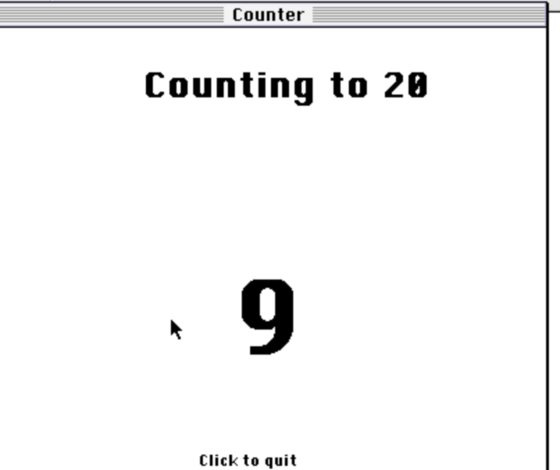
Step 9 — Integer to Pascal string, by division
There is no NumToString available here — the Toolbox routine of that name lives in a library this program deliberately does not link — so the conversion is written out. It runs in two passes: count the digits, then fill them in backwards.
NTS_Conv:
        DIVU    #10,D1
        SWAP    D1                      ; D1 low word = remainder
        MOVE.W  D1,D2
        ADD.B   #'0',D2                 ; remainder -> ASCII digit
        MOVE.B  D2,-(A1)                ; store, moving backwards
        CLR.W   D1
        SWAP    D1                      ; D1 = quotient, continue
        TST.W   D1
        BNE.S   NTS_Conv
DIVU.W #10,D1 divides the 32-bit D1 by 10 and returns both results packed into the same register: quotient in the low word, remainder in the high word. Extracting them is the SWAP/CLR.W/SWAP dance above — swap to read the remainder, clear it, swap back to be left with the quotient as the next dividend. Digits therefore emerge least-significant first, which is why MOVE.B D2,-(A1) writes with pre-decrement, filling the buffer from its end toward its start. The digit count computed by the first pass is what positions A1 to begin with, and it is also written into byte 0 — the Pascal length prefix.
The first pass, which counts the digits, needs only the quotient, so it discards the remainder outright:
NTS_Count:
        DIVU    #10,D2              ; D2 = [remainder : quotient]
        ADDQ.W  #1,D3
        ANDI.L  #$0000FFFF,D2       ; keep the QUOTIENT as the next dividend
        TST.W   D2
        BNE.S   NTS_Count
The defect this walkthrough found
That masking instruction is not what was originally written. Reading the routine line by line in order to describe it here surfaced a real bug: the counting pass performed the same CLR.W/SWAP dance as the conversion pass but without the leading SWAP, and therefore carried the remainder forward as its next dividend instead of the quotient.
Below 100 the two produce the same digit count, so the shipped program — which counts to 20 — was correct in every run it ever made. The defect existed entirely outside the range the program uses, which is why nothing had ever exposed it.
It was not harmless, though, and the consequence is worse than an undercount. With too few digits, the second pass positions its write pointer too close to the front of the buffer; its stores are pre-decrementing, so they run off the start of the buffer and overwrite the Pascal length byte — and then the inline string declared in front of it.
The prediction was testable, so it was tested. Two variants of the program, identical but for that one instruction, were assembled, linked and launched on the guest with the counter starting at 998:
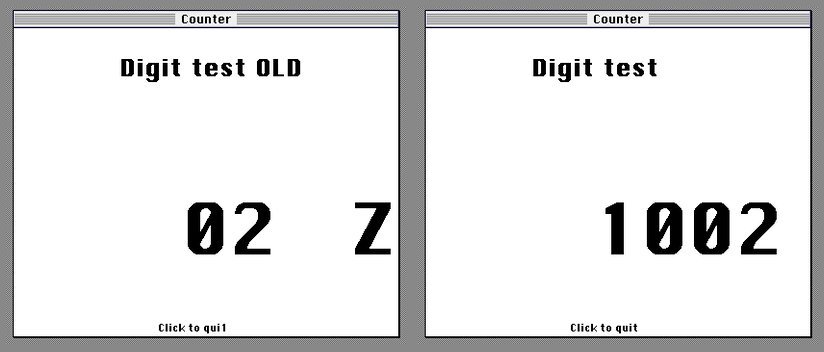
| Build | Drawn number | The string declared in front of the buffer |
|---|---|---|
| before | 02 Z — length byte overwritten, so DrawString draws 57 bytes of whatever follows | Click to qui1 — its final byte overwritten |
| after | 1002 | Click to quit — intact |
The corrupted Click to qui1 in the left-hand window is the buffer underflow made visible: the fourth digit of 1002 was stored one byte below the start of NumStr, which is the last byte of ExitText.
The repaired routine is what the source now contains, and Counter10i still counts 1 to 20 exactly as before. The episode is a reasonable argument for walking through code line by line even when it demonstrably works: the program had run correctly every time it was ever launched, and the defect was found by reading rather than by running.
Step 10 — One event pump, and a non-local exit
Every phase calls the same routine:
PumpEvent:
        CLR.W   -(SP)                   ; space for the Boolean result
        MOVE.W  #everyEvent,-(SP)
        PEA     EVT(A6)
        MOVE.L  #1,-(SP)                ; sleep (ignored, see above)
        CLR.L   -(SP)                   ; mouseRgn = NIL
        _WaitNextEvent
        MOVE.W  (SP)+,D0
        TST.W   D0
        BEQ.S   PE_Done
        MOVE.W  EVT(A6),D1              ; event.what
        CMPI.W  #mouseDown,D1
        BEQ     QuitApp                 ; <-- leaves this subroutine for good
        CMPI.W  #updateEvt,D1
        BNE.S   PE_Done
        MOVE.L  EVT+2(A6),A3            ; event.message = the WindowPtr
        MOVE.L  A3,-(SP)
        _BeginUpdate
        BSR     DrawContent
        MOVE.L  A3,-(SP)
        _EndUpdate
PE_Done:
        RTS
The EventRecord field offsets are hard-coded: what at 0, message at 2. For an updateEvt the message is the WindowPtr needing repair, and the BeginUpdate/EndUpdate pair around the drawing is what confines it to the damaged region and clears the update region afterwards. Skip them and the window enters a permanent redraw loop, because nothing ever tells the Window Manager the damage was repaired.
The most interesting line is BEQ QuitApp. That is a branch out of a subroutine, from inside a BSR frame, directly into the exit path — something a C compiler would need longjmp to express. It is safe here for one specific reason:
QuitApp:
        ...
        UNLK    A6
        RTS
UNLK A6 loads SP from A6 and pops the old A6. Since A6 was established by LINK in main, the stack pointer is restored to main’s frame — and the return address that BSR PumpEvent pushed, which sits below that point, is discarded along with everything else. The subsequent RTS returns to the runtime that called main. The abandoned frame does not leak because the stack pointer is reset wholesale rather than unwound.
This is the sort of construction that is either elegant or a latent disaster depending entirely on whether A6 is what you think it is. Here there is exactly one LINK in the program, which is what makes it defensible.
Building and running it over the bridge
The program is linked like a C application, against the MPW runtime, so that the runtime performs the A5-world setup and calls main:
Asm  counter10i.a -o counter10i.a.o
Link -o Counter10i counter10i.a.o "{Libraries}Interface.o" \
     "{Libraries}MacRuntime.o" -t APPL -c 'Cn10'
| Element | Why it is there |
|---|---|
Interface.o | the Toolbox interface library |
MacRuntime.o | sets up the A5 world and calls main — the reason main is PROC EXPORT |
-t APPL | file type; without it the Finder will not launch the file |
-c 'Cn10' | creator signature |
(no Rez step) | the window is built in code, so there is no resource fork to compile |
Driven over AppleBridge, each of those is one call, and the artefact is verified rather than the status code — a long Link can return an Apple Event timeout and still have completed:
| Step | Over the bridge |
|---|---|
| put the source on the guest | mac_put_file (UTF-8/LF → MacRoman/CR) |
| assemble | mpw_execute "Asm counter10i.a -o counter10i.a.o" |
| link | mpw_execute "Link …" |
| confirm the artefact | mpw_execute "Exists Counter10i" |
| run it | launch_app "MeinMac:MPW:OurTest:Counter10i" |
| watch it | mac_screenshot |
| stop it | mac_click — any mouseDown quits |
The assembler emits a handful of “a short branch could be used here” warnings. Those are style notes about BRA/BSR reaching targets that a .S form could also reach; they are not errors and the binary is correct with them present.
What the exercise actually demonstrates
The program is trivial. What it demonstrates is not.
It shows that a complete, GUI-bearing 68K application can be authored on a modern host, transported into a 1996 operating system, assembled by the period toolchain, linked, launched and observed — without touching the guest’s keyboard once. It shows that the resulting binary obeys the platform’s cooperative contract well enough to run alongside a background network service without disturbing it. And it shows where the emulator’s abstractions leak: a program that would have paced itself correctly on real hardware in 1996 must be rewritten to pace itself against host CPU time instead, because the one clock it was designed to trust no longer measures anything.
The full source, with the build recipe in its header comment, is published as part of the AppleBridge repository: