
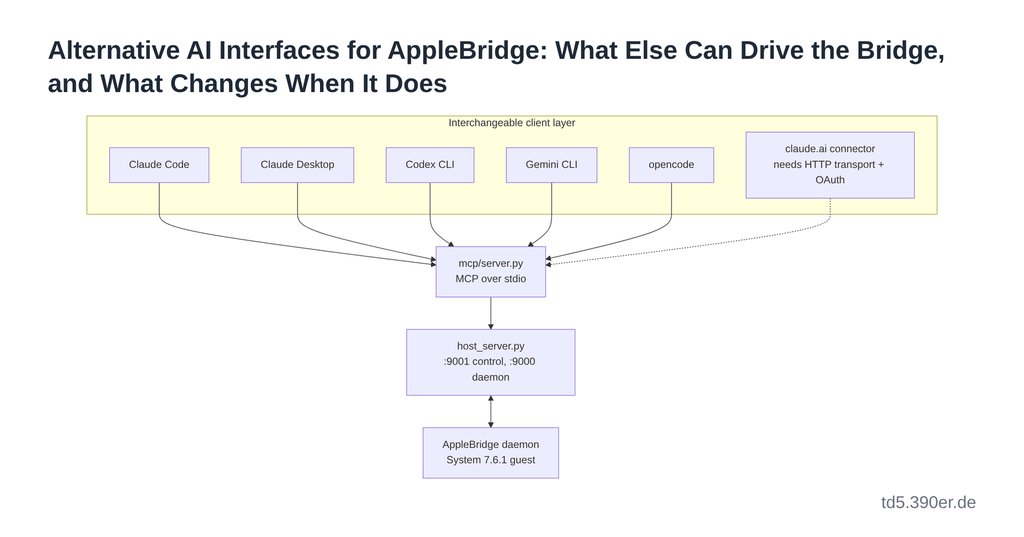
Every note in this section so far has assumed the same operator: Claude Code, on the host, holding one end of the bridge. That assumption is worth examining, because it is not actually load-bearing. AppleBridge’s own README names Claude Code in its first line, and .mcp.json configures exactly one client — but nothing in mcp/server.py, host_server.py, or the 68K daemon knows or cares which client is on the other side of the pipe. The coupling is a convention, not a dependency.
This note asks what happens when the convention is broken: which other interfaces can drive the bridge, what each one is good at, and where swapping the client changes the character of the work rather than just its packaging.
What Is Actually Coupled
Three layers sit between an operator and a running 68K binary, and only the topmost is client-specific.
The Apple Events layer talks to ToolServer inside the guest. The TCP/OpenTransport layer carries commands between host_server.py and the daemon, with the Mac dialling outward to sidestep the emulator’s NAT. Neither has any notion of an AI at all. The MCP layer exposes thirty tools over stdio — and MCP is an open protocol with a growing field of implementations. Whatever speaks MCP can call mpw_execute, mac_screenshot, or mac_write_file with exactly the semantics Claude Code sees.
So the honest description of the architecture is not “Claude Code drives a Macintosh.” It is “an MCP client drives a Macintosh, and Claude Code happens to be the one that was configured first.”
flowchart TB
    subgraph Clients["Interchangeable client layer"]
        CC["Claude Code"]
        CD["Claude Desktop"]
        CX["Codex CLI"]
        GC["Gemini CLI"]
        OC["opencode"]
        WEB["claude.ai connector
needs HTTP transport + OAuth"]
    end
    MCP["mcp/server.py
MCP over stdio"]
    HS["host_server.py
:9001 control, :9000 daemon"]
    AB["AppleBridge daemon
System 7.6.1 guest"]
    CC --> MCP
    CD --> MCP
    CX --> MCP
    GC --> MCP
    OC --> MCP
    WEB -.-> MCP
    MCP --> HS
    HS <--> AB
The dotted line is the only one that needs new code. Everything else is a configuration file.
Category One: Other Agentic CLIs
The terminal-agent field has widened considerably during AppleBridge’s lifetime, and most current entrants speak MCP.
Codex CLI (OpenAI) is the lowest-friction switch for anyone already paying for ChatGPT, since Codex access is usually bundled and sufficient for daily work — no second coding-agent subscription. It has also held the top published position on Terminal-Bench 2.1, which measures precisely the kind of long, tool-mediated shell work the bridge demands.
Gemini CLI (Google) is attractive for its free tier, which matters more here than usual: driving a 68K compile loop burns turns, and a generous daily quota absorbs the flailing that MPW’s error messages provoke.
Antigravity CLI (also Google) is terminal-first, lightweight, and explicitly built to behave over SSH — relevant if the emulator host is not the machine you are sitting at. It supports skills, hooks, sub-agents, and project instructions, which maps neatly onto AppleBridge’s existing CLAUDE.md conventions.
opencode is the most-starred open-source agent in the category, MIT-licensed, provider-agnostic, and a pure TUI. Kilo CLI goes further on flexibility, connecting to VS Code, JetBrains, GitHub and local models. Cline and Roo Code live inside VS Code with bring-your-own-key.
The relevant caveat is not about harnesses but about training data. Everything AppleBridge does is unusual: MPW shell syntax, SetFile -t APPL, MacRoman round-tripping, Toolbox trap patching, the difference between MPS and MPSX as Apple Event targets. These are not evenly distributed across models. A harness with better file-editing ergonomics but a shakier grasp of 1994 linker conventions is a net loss on this particular codebase — and the only way to find out which is which is to hand each one the same task and read the transcript. That experiment has not been run here, and the benchmark tables do not answer it.
Category Two: Other Claude Surfaces
A separate question is whether the bridge should be reachable from something other than a terminal at all.
Claude Desktop takes local stdio MCP servers directly. The existing .mcp.json configuration moves, essentially unchanged, into the desktop app’s config, and the bridge is then operable from a chat window on the same machine. No tunnel, no authentication layer, no new code. Screenshots — which the bridge already captures from the emulated framebuffer and decodes to PNG on the host — render inline. For a project whose most persuasive artefact is a picture of System 7 doing something it was never asked to do, that is not a cosmetic detail.
A claude.ai connector is the more ambitious option and the more expensive one. Remote connectors require an MCP server reachable over HTTPS with a streaming HTTP transport and OAuth, whereas AppleBridge’s server is stdio talking to localhost:9001. The work is a transport wrapper, an authentication layer, and a tunnel or reverse proxy. For an operator already running remote MCP servers on their own domain, the infrastructure is the easy part; the transport seam is the actual task, and it is not large.
What the Chat Surface Is Good At
It is worth being precise about which half of the workload migrates well, because the answer is not “all of it.”
The build loop does not migrate. Write C, compile with SC, read the linker’s complaint, correct, relink, set the file type, launch. Twenty turns is a modest example. That loop is what agentic CLIs are built for, and it is what a chat interface handles worst — no persistent working directory, no diff-based editing, no local repository, and a latency budget that makes iteration tedious rather than fast.
The observational half migrates very well. Is the daemon up. Show me the screen. What is in that folder. Read this resource fork. MACSTATUS, mac_screenshot, mac_list_files, mac_read_file are all single-shot questions with legible answers, and single-shot questions are what a chat window is for. Answering them from a phone, away from the machine, is a capability the terminal simply does not have.
There is also a pedagogical case. The README’s stated ambition includes an AI tutor for 68K assembly and Toolbox APIs. Someone who wants that has no particular reason to install a coding agent first. A chat interface with a bridge behind it is a far lower doorstep than a CLI, a project checkout and an MCP configuration file.
The Part That Deserves Caution
The tool surface includes command execution, file writing and input injection. Exposed remotely, that is a remote code execution endpoint, and describing it any other way would be dishonest.
Confined to the emulated guest this would be tolerable — System 7 is not a machine anyone is defending. But Basilisk II conventionally shares a host directory with the guest, and that directory is a path out of the sandbox and onto the real filesystem. Authentication does not remove the exposure; it only decides who has it.
The proportionate response is not to abandon the idea but to stop treating the thirty tools as one indivisible surface. A remote profile that exposes status, screenshots, directory listings and file reads — and nothing that writes, executes or injects — covers the entire observational use case above while removing the class of tool that makes exposure frightening. Two server profiles, one codebase, selected by configuration. The local stdio path keeps everything.
Verdict
AppleBridge is less Claude-Code-specific than its documentation implies, and the cheapest way to prove that is also the cheapest thing to try: point Claude Desktop at the existing stdio server and see whether the chat surface is pleasant to operate. It costs a config file.
Beyond that, the two directions diverge. Swapping in a different agentic CLI is a question about models — whether another one knows MPW and the Toolbox as well — and is answered by experiment, not by benchmark tables. Building a remote connector is a question about reach, and is answered by deciding how much of the tool surface deserves to leave the machine. Both are worth doing. Neither is the same project.
The daemon, for its part, will not notice.