
Asked for in the Emaculation forum by a reader who wants AppleBridge driven by a locally hosted model rather than by Claude Code, and who sees it as a possible replacement for ToolDaemon. Both are reasonable, and both need the same thing: a description of the client side that does not assume which client you are.
The short version is that MCP is a wrapper, not the interface. Underneath it is a line protocol on a local TCP port that any language can speak in twenty lines. Which of the two you want depends on whether your model already speaks MCP.
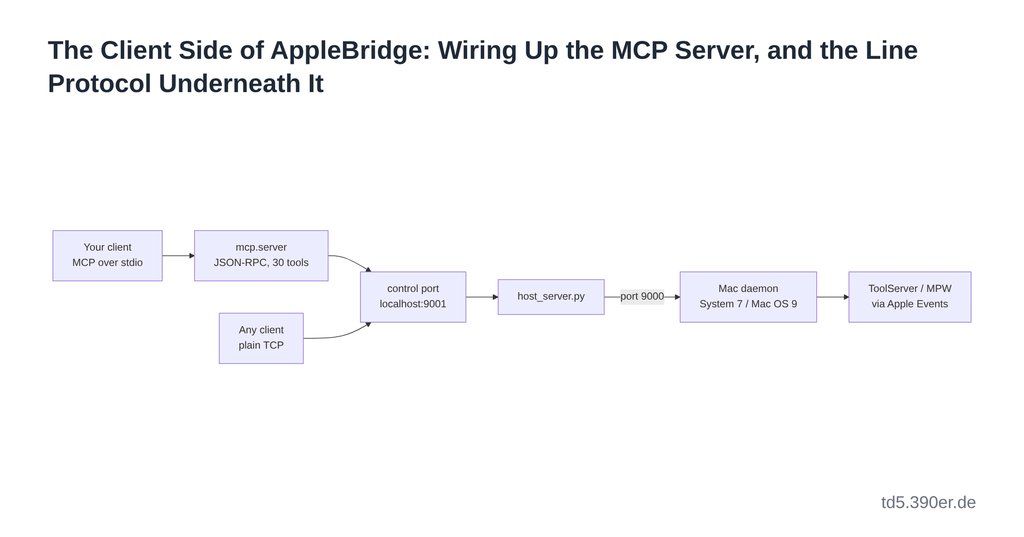
What the client is actually talking to
flowchart LR
  C1["Your client
MCP over stdio"] --> M["mcp.server
JSON-RPC, 30 tools"]
  M --> P["control port
localhost:9001"]
  C2["Any client
plain TCP"] --> P
  P --> H["host_server.py"]
  H -->|"port 9000"| D["Mac daemon
System 7 / Mac OS 9"]
  D --> T["ToolServer / MPW
via Apple Events"]
host_server.py serves both ports: 9000 for the guest daemon, which dials out because the emulator sits behind NAT, and 9001 for control. The MCP server is a client of 9001 like any other. It adds a tool schema, argument validation, MacBinary framing for file transfer, image content blocks for screenshots, and a set of host-side conveniences — it adds no access.
Path 1 — the MCP server
Requirements
Python 3.9 or newer, and nothing else. The mcp/ package and everything it imports from host/ are stdlib-only: there is no pip install, no virtual environment, no SDK. That is deliberate and load-bearing elsewhere in the project, and it means a client author’s setup step is a path, not a dependency tree.
Configuration
The server speaks MCP over stdio. Any client that can launch a subprocess can host it. In Claude Code it lives in .mcp.json at the repository root:
{
  "mcpServers": {
    "applebridge": {
      "type": "stdio",
      "command": "uv",
      "args": ["run", "python", "-m", "mcp.server"],
      "env": {}
    }
  }
}
Without uv, or from another client whose config wants an absolute invocation:
{
  "command": "/usr/bin/python3",
  "args": ["-m", "mcp.server"],
  "cwd": "/path/to/AppleBridge",
  "env": {}
}
cwd matters: the package resolves host/ relative to its own file, but the module must be importable as mcp.server, so the working directory has to be the repository root. Startup notes go to stderr — stdout carries JSON-RPC and nothing else.
What the server implements, and what it does not
| Method | Supported |
|---|---|
initialize | yes — protocol 2024-11-05, serverInfo applebridge |
tools/list | yes — all 30 tools with JSON Schema |
tools/call | yes |
ping | yes |
| resources, prompts, sampling, notifications | no |
This is a deliberately minimal server. A client that requires resources or prompt templates will need to tolerate their absence; a client that only calls tools will not notice.
Environment
| Variable | Effect |
|---|---|
APPLEBRIDGE_CTRL_TOKEN | opt-in shared secret for the control port. When set, every request is prefixed with an AUTH:<token> line. It must match the host server’s value — fail-closed. Unset (the default) means the guard is off. |
APPLEBRIDGE_KEY_LAYOUT=de | swaps Y and Z for a guest running a German KCHR, so mac_key/mac_menu derive the right physical key code. |
Note that the control-port token is separate from the wire token between host and daemon. They are different guards on different hops.
The tool surface
Thirty tools, in the groups they were built in. Arguments marked * are required.
Drive a build, read its output
| Tool | Arguments |
|---|---|
mpw_execute | command*, timeout |
mac_compile | source_path*, output_path, options, lint |
mac_build | project_dir*, app_name, sources, libraries, rez_file, file_type, creator, model, run |
mac_read_file | path* |
mac_list_files | path* |
mac_send_apple_event | target_creator*, event_class*, event_id*, direct_object, expect_reply, wait_seconds |
Move bytes, run, observe, interact
| Tool | Arguments |
|---|---|
mac_put_file | host_path*, mac_path*, type, creator, resource_path |
mac_get_file | mac_path*, host_path*, format |
mac_write_file | path*, content*, type, creator |
launch_app | path* |
mac_screenshot | region |
mac_type | text* |
mac_key | key, char_code, key_code, modifiers |
mac_click | x*, y*, count, modifiers |
mac_menu | key, modifiers, title, item |
mac_menu_front | menu_id*, item*, menu_x |
mac_clipboard_get / mac_clipboard_set | — / text* |
The host’s real mouse (local emulator, macOS host only)
| Tool | Arguments |
|---|---|
mac_host_click | x*, y*, count, keep_front, modifiers |
mac_host_menu | title_x*, title_y*, item_x*, item_y*, keep_front |
mac_host_screenshot | region |
run_applescript | script* |
Network, lifecycle, diagnosis
| Tool | Arguments |
|---|---|
mac_appletalk_browse | entity_type, zone, name |
mac_status | — |
bridge_doctor | — |
mac_verbose_log | max_bytes |
mac_restart_toolserver | path |
mac_update_daemon | host_path*, mac_dir, staged_name |
mac_reboot / mac_shutdown | — |
Two of these answer when the rest cannot: mac_status reports even with the daemon down, and bridge_doctor runs entirely host-side, so it diagnoses a stack whose server is not running. Start there when nothing works.
Content blocks
Most tools return a JSON text block. mac_screenshot and mac_host_screenshot return two blocks: a real image block carrying base64 PNG, and a text block with the metadata (dimensions, depth) and the base64 stripped out. A client that concatenates all text blocks therefore gets a compact summary rather than a megabyte of base64 — but a client that ignores image blocks gets no picture at all. Worth checking before concluding the screenshot is broken.
Path 2 — the control port directly
If your model cannot speak MCP, skip it. Port 9001 takes one command per connection:
[AUTH:<token>\n]         optional, only when a token is configured
[DEADLINE:<epoch>\n]     optional, see below
<command>\n\n
Then read until the server closes the socket. That close is the end-of-reply signal; a read that times out first has an incomplete reply that must not be trusted.
The reply is framed:
STATUS:<code>
STDOUT:<len>
<data>
STDERR:<len>
<data>
Three rules that a client author will otherwise learn the hard way:
- A reply with no
STATUS:line is never a success. The server emits bare sentinels —No responsewhen the daemon is not connected,ERROR: …when a command never round-trips. Defaulting a missing status to zero turns all of those into clean empty results, which is how they hide. - Read by declared length, not by terminator. The guest is a classic Mac: its line ending is CR, the host’s is LF, and both appear in the same response. Anything that splits on one of them will eventually cut a payload in half.
- Send
DEADLINE:if your client can give up. Every well-behaved client half-closes after sending, so the server sees FIN while the caller is still waiting — it cannot tell an abandoned client from a patient one. The deadline is how you say when you stop caring; without it, a command whose caller has vanished still runs.
From the shell, for a smoke test:
printf 'DISKINFO\n\n' | nc localhost 9001
printf 'screenshot\n\n' | nc localhost 9001     # base64 PNG in the reply
cd host && ./send_command.py 'Echo HELLO'
host/send_command.py is forty lines of stdlib and is the shortest complete example of a client. Read it before writing your own.
The trap on this path
A verb with no host-side route is not an error. It falls through to ToolServer, which swallows it and answers STATUS:0 with empty output. So a misspelled verb, or one this host server does not know, reports success and does nothing — the single most expensive failure shape in this project. If a new verb “works but does nothing”, check the dispatch chain in host_server.py first, and read mac_verbose_log: the daemon’s console shows initAE / found=TS / send=0, which gives it away.
What will bite you regardless of path
- A timeout is not a failure. Long commands —
Linkabove all — return-1712(an Apple Event timeout) and frequently complete anyway. Verify by the artefact, not by the status. This has been true since the first week and has not stopped being true. - Only ToolServer returns output. MPW Shell executes commands perfectly and answers with an empty Apple Event reply. If your output is always empty, you are talking to the wrong one.
- One socket per command, by design. Persistent client connections were considered and deferred: the guest link is already persistent, and the gain sits entirely on the client side.
- The tool list is cached by the client. A tool added to
mcp/tools.pyappears after the client restarts its MCP server, not before. run_applescriptand themac_host_*tools are macOS-only, and the host-mouse ones additionally need the emulator visible and frontmost on the same machine. Everything else in the list is host-OS-independent, because it executes in the guest.- The control port has no authentication by default. It binds localhost and the token is opt-in. If you expose it beyond the machine — an ssh tunnel is the sane route — set
APPLEBRIDGE_CTRL_TOKENon both sides first.
Which path to choose
Use the MCP server if your client speaks MCP: you get schemas, validation, MacBinary handling and image blocks for free, and they are exactly the parts that are tedious to reimplement.
Use the control port if it does not, or if you are embedding AppleBridge in something that is not a chat loop at all — a build script, a test harness, a video-walkthrough driver. The line protocol is stable, it is what the MCP server itself uses, and nothing in the tool surface is reachable only through MCP.
Quellen
- Installing AppleBridge: https://td5.390er.de/applebridge/installing-applebridge/
- What You Can Do With It: https://td5.390er.de/applebridge/what-you-can-do-with-applebridge/
- Model Context Protocol specification: https://modelcontextprotocol.io
- Source: mcp/server.py, mcp/tools.py, mcp/mac_connection.py, host/host_server.py, host/send_command.py