
AppleBridge lets an AI agent — Claude Code — build, compile, link, and run authentic 68k Macintosh software on a real System 7.6.1, running inside the Basilisk II emulator.
Want to test the Result 1st hand? - Here is one sample, my 1st success with a Text Adventure in MacBinary format: MacVenture.bin
Initially, I planned taking the genius Fort Apocalypse from Steve Hayls as sample, but I am lacking his green lit.
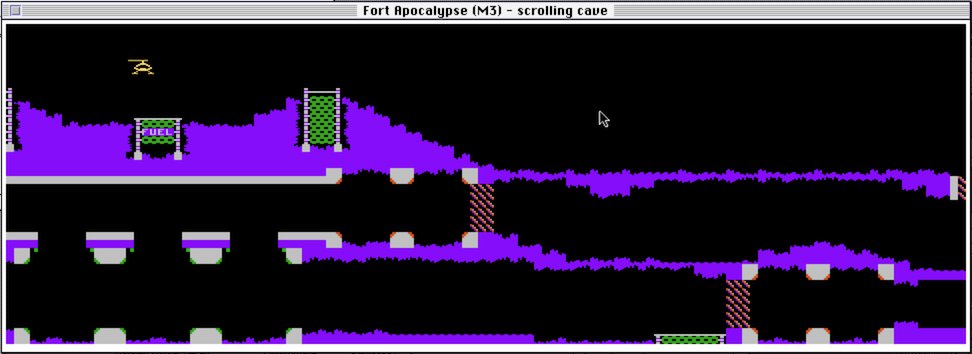
That’s sad, as I did hope to do some Assembler finger training porting it over from the Atari 400/800 world onto our beloved Mac68k world. But anyway, let’s proceed with the boring text advanture as a sample.
You write C or 68k assembly on a modern Mac, say what you want in plain language, and the bridge carries the commands across thirty years of computing history to MPW and ToolServer on the classic side — then hands the real output back. The goal is simple to state and hard to earn: talking to a 1990s Macintosh should feel as dependable as a local shell.
Here a quick sample. - I am asking to list the files in the current directory:
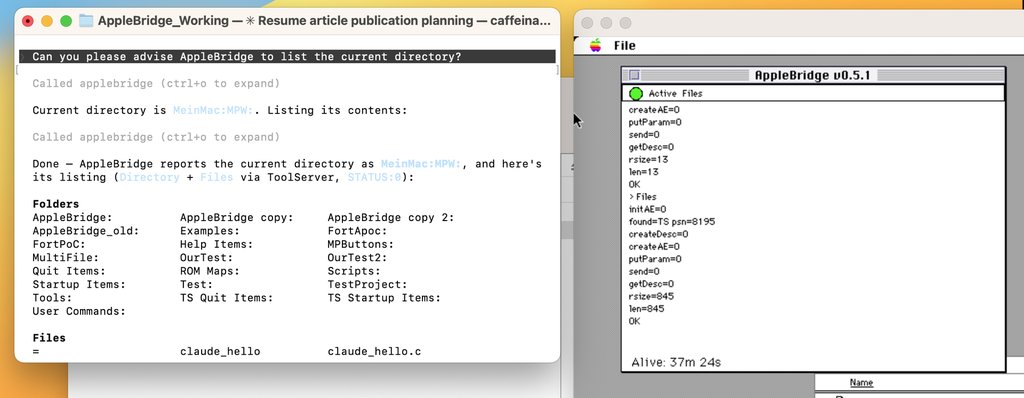
A Sidenote: 1991 Macintosh is an exageration, as I am heavily using TCPIP on the COM stack. That wasn’t in place 1991 and 1st test with AppleTalk revealed that this route would become a bit bumpy.
This is an overview of how AppleBridge pulls that off, and how its MCP tools are best put to work — including a few captures taken live from the running bridge while this article was written.
The problem: a brilliant machine with 1991 manners
System 7.6.1 on a 68k Mac is a wonderful, fragile thing. It has a few megabytes of memory, a CPU measured in tens of megahertz, cooperative multitasking that a single misbehaving app can freeze, and a networking stack from the dawn of consumer TCP/IP. None of that was designed to be driven by an autonomous agent issuing build commands over a socket.
Three obstacles stand out, and AppleBridge has a dedicated answer to each:
- Networking — the emulator lives behind NAT, so the host can’t dial in.
- File sharing — getting source onto the Mac without corrupting it.
- Seeing the screen — System 7.6.1 has no screenshot tool.
Architecture: the Mac dials out
flowchart LR
    A["Claude Code
(AI agent)"] --> B["MCP server
(stdio)"]
    B -->|"control :9001"| C["host_server.py
(:9000 + :9001)"]
    C -->|"command over TCP :9000"| D["AppleBridge daemon
(System 7.6.1, 68k)"]
    D -->|"Apple Events"| E["ToolServer / MPW Shell"]
    E -->|"SC / Asm / Link / Run"| F["68k Macintosh app"]
    D -.->|"daemon dials OUT first"| C
Because the emulated Mac sits behind NAT, the connection is reversed: the Mac daemon connects out to the host, not the other way around. host_server.py listens on two ports — :9000 for the daemon and :9001 for control and MCP traffic — and simply relays. The wire protocol is deliberately blunt: a request is COMMAND:<len> followed by the payload; a response is a length-framed STATUS / STDOUT / STDERR block that the host reads by declared byte count, not by terminator. That one decision is what lets large compiler listings and multi-kilobyte file dumps survive the trip intact — responses larger than 64 KB stream through a dynamic buffer rather than overflowing a fixed one.
On the Mac side, commands arrive as Apple Events and are dispatched to ToolServer. This matters: the plain MPW Shell will execute a command but returns an empty reply, so the agent is working blind. ToolServer returns real stdout, which is what makes closed-loop debugging — compile, read the error, fix, recompile — possible at all.
Pillar 1 — File sharing without corruption
The host exposes a shared folder that appears on the Mac as the Unix: volume. It’s read-only from the Mac side, so the workflow is: drop converted files in the share, then Duplicate them onto local Mac storage before building.
The subtle part is encoding. The host speaks UTF-8 with \n line endings; the Mac speaks MacRoman with \r. Ship a file across untranslated and the compiler chokes — or worse, an MPW special character like ∂ (line continuation), ƒ (folder), or ≈ (wildcard) silently turns into garbage. AppleBridge’s encoding_convert.py handles the round trip in both directions, mapping characters and line endings so a file written on the host compiles cleanly on the Mac.
Pillar 2 — Seeing the emulated screen
System 7.6.1 can’t take its own screenshot, and grabbing the host desktop captures the wrong thing entirely. So the daemon captures the emulated screen itself: it reads the main GDevice’s PixMap — pixels, colour depth, and colour table — and streams that raw pixmap over the bridge. The host then decodes it to PNG with a pure-stdlib script, no image libraries required. The result is a pixel-accurate view of exactly what the classic Mac is showing, at full 1024×768.
The seven MCP tools, and how to use them well
Everything above is exposed to any Claude session as seven MCP tools, so there’s no glue code to write:
| Tool | What it does |
|---|---|
mpw_execute | Run any MPW/ToolServer command, get stdout back |
mac_read_file | Read a file off the Mac |
mac_write_file | Write a file onto the Mac |
mac_list_files | Directory listing with type, creator, size, dates |
mac_compile | Compile a source file |
mac_screenshot | Capture the emulated screen as PNG |
launch_app | Launch a built application |
A few hard-won rules make these tools reliable rather than merely available:
- Link, never ILink. The modern
Link -model faris the verified default;ILinkalso works with the correct library paths — the old “ILink crashes Basilisk II” belief traced to an empty{LIBS}, not the linker. - Verify by artifact, not by status. A long
Linkmay report an Apple Event timeout yet still have produced a perfectly good executable — so check that the file exists and has a non-empty resource fork (theCODEresources) — a 0-byte data fork is normal for 68K, don’t trust the return code. - Capture stderr with
≥, never2>&1. The Unix-style redirect crashes the MPW Shell outright; MPW’s own≥ file.erroperator does the job safely. - Build off the running daemon. A heavy link inside the same ToolServer that’s serving the bridge can take the bridge down with it — so link to a
.newfile and swap.
The throughline: prefer the smallest tool that answers the question, and always confirm the result rather than assuming the command’s exit signal told the truth. On a thirty-year-old emulator, the artifact is ground truth.
Live from the bridge
The captures below were taken live while writing this article, through the same MCP tools described above:
mpw_execute("Echo HELLO from AppleBridge")→ returnedHELLO from AppleBridgewithSTATUS:0— proof that ToolServer is answering with real output, not an empty reply.mac_list_files("MeinMac:MPW:")→ a full directory listing includingToolServer(APPL/MPSX), theMPW Shell, and theAppleBridgebuild folder.mac_screenshot()→ the 1024×768, 8-bit image below, captured from the emulated framebuffer and decoded to PNG on the host.
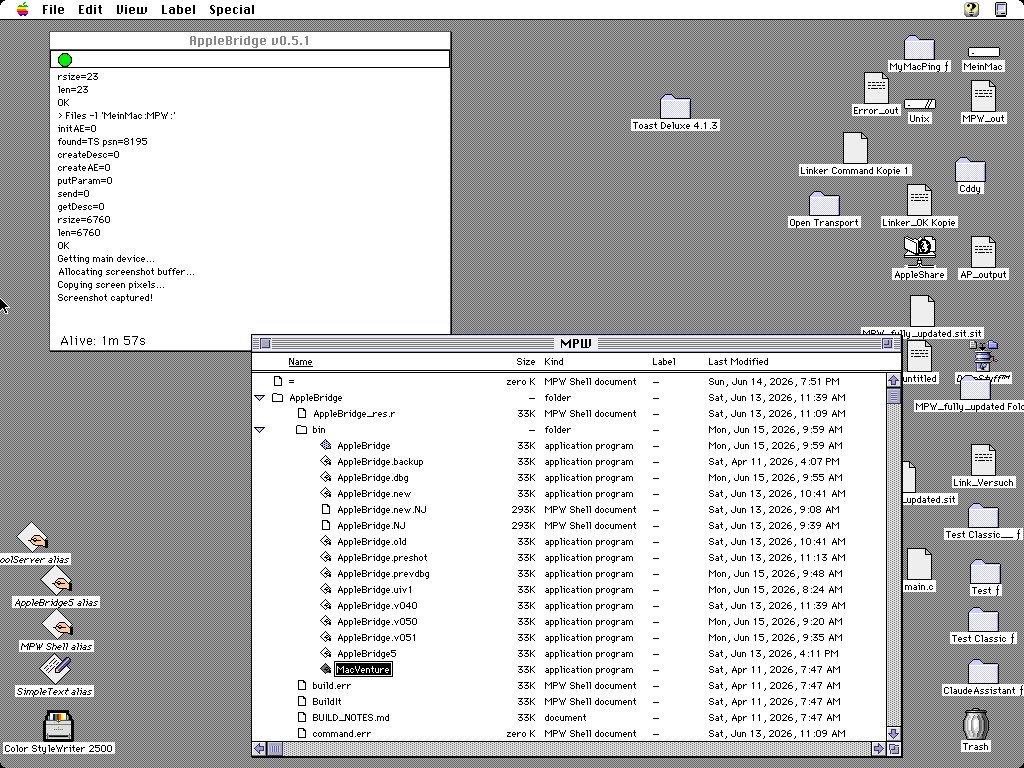
In the daemon window you can see the green Active LED, the command console mid-request, a Screenshot captured! line, and an uptime counter — the small pieces of visible health that turn a silent socket into something you can actually trust.
Why it matters
AppleBridge isn’t really about nostalgia. It’s a small proof that an AI agent can drive genuinely alien hardware — different byte order, different character set, different event model, different failure modes — if the bridge between them is honest about what’s happening and resilient to the rough edges. A 68k Mac with a few megabytes of RAM is about as far from a modern dev container as you can get, and yet, command by command, it answers. That’s the interesting part.