
The install is done and the daemon says host_connected=1. What now?
Everything below was run on a live System 7.6.1 guest in Basilisk II while this page was being written, and the two pictures are the guest’s own framebuffer — not a mock-up, not a photograph of a screen.
Two ways in, the same bridge underneath
From a shell, the control port on localhost:9001 speaks a small set of
verbs. No client library, no dependencies:
printf 'MACSTATUS\n\n' | nc -w 5 localhost 9001
printf 'DISKINFO\n\n'  | nc -w 5 localhost 9001
From Claude Code, the same capabilities arrive as MCP tools — thirty of them — so you can write “build this and show me the window” and the agent picks the verbs. The tool names below are the MCP ones; the uppercase words are what goes over the wire if you prefer typing.
Neither route is privileged. The MCP server talks to the same control port you
can reach with nc.
Ask the machine about itself
DISKINFO returns every mounted volume — name, reference number, total and free
bytes — straight from the guest’s File Manager:
MeinMac           -1   2 144 363 520   1 622 366 720
Unix              -2   1 073 725 440   1 073 725 440
AppleBridge Kit   -3       2 062 336       1 842 688
LISTDIR lists a folder with type and creator, which is what you actually need
on a Mac — a file’s type is not in its name:
AppleBridge           APPL   ABrg   83566
AppleBridge Welcome   TEXT   ABrg       0
AppleBridgeConfig     APPL   ABcf   15688
AppleBridgeInstaller  APPL   ABis   41884
AppleBridgeWatchdog   APPL   ABwd    8992
Both work without MPW or ToolServer. They are answered by the daemon itself, which matters more than it sounds: a guest with no development tools installed is still fully inspectable.
See the screen
mac_screenshot — or screenshot on the control port — captures the
emulated framebuffer: the daemon reads the main GDevice’s PixMap, streams
the pixels with their colour table, and the host decodes a PNG. It is not a
capture of your Mac’s screen with the emulator window in it, so overlapping
windows and window position cannot spoil it, and it works when the emulator is
not even frontmost.
Every image on this page came out of that path.
Move files, with both forks
A classic Mac file has two forks, and a transfer that keeps only the data fork
silently destroys applications, fonts and anything with resources.
mac_put_file and mac_get_file carry both, using MacBinary in transit.
Measured on the guest shown here, round-tripped host → guest → host and compared byte for byte: 4 KB at roughly 16 KiB/s, 64 KB at 138, 512 KB at 246 KiB/s. The data fork comes back identical; the resource fork comes back intact apart from the Resource Manager’s own name stamp, which it writes when it opens the file.
For text there is mac_write_file, which converts UTF-8 to MacRoman and LF to
CR on the way — a step people forget once and then debug for an hour.
Type and click
mac_type, mac_key and mac_click post into the guest’s event queue, so they
arrive at whatever application is frontmost. Modifiers work: the daemon stamps
the modifier field and holds the low-memory key map, so Command-shortcuts
reach the front application’s menu handling.
Here the host typed an address into the AppleBridge control panel in the guest — no mouse, no VNC, no remote desktop:
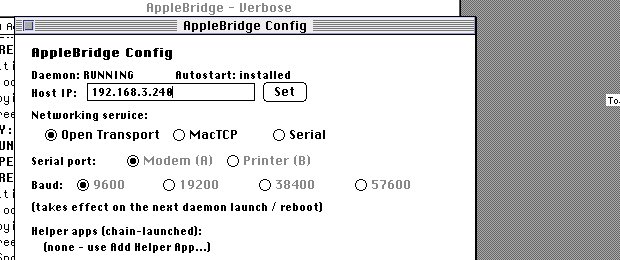
The clipboard is bridged too: mac_clipboard_get reads the guest’s TEXT scrap
and mac_clipboard_set replaces it, which is the shortest path for moving a
snippet in either direction.
Build and run software
This is the part the whole thing exists for. With MPW and ToolServer in the guest — both optional, both free — the host can compile.
The program below was written on macOS, in a normal editor. Then, over the bridge:
# convert to MacRoman + CR, drop into the shared folder
uv run python host/encoding_convert.py to-share bridgedemo.c

# in the guest, over the wire:
Duplicate -y Unix:bridgedemo.c :src:bridgedemo.c
SC -i :include: -model far :src:bridgedemo.c -o :obj:bridgedemo.c.o
Link -model far -o :bin:BridgeDemo :obj:bridgedemo.c.o Interface.o MacRuntime.o
SetFile -t APPL -c BDmo :bin:BridgeDemo
and then LAUNCH. Thirty seconds later the window is on the emulated screen —
and behind it, the daemon’s own console shows the whole sequence that put it
there:
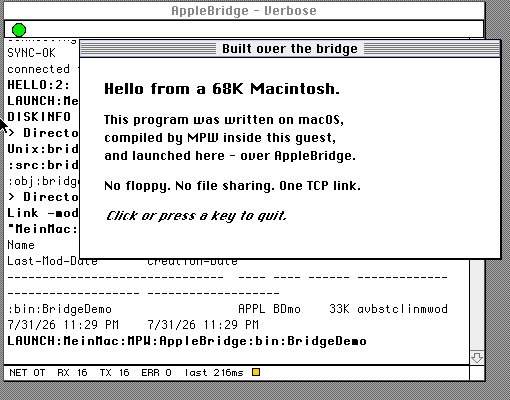
One rule governs any program you build this way, and it is not stylistic:
yield. System 7 schedules cooperatively, so a program that spins in a loop
instead of calling WaitNextEvent starves the AppleBridge daemon running behind
it and takes the bridge down with it. The demo above yields every fifteen ticks.
mac_build does the whole SC → Link → Rez → SetFile sequence in one call and
verifies by the artifact rather than the status code — which matters because a
long link can return an Apple Event timeout and still have succeeded.
What has actually been built
The list below is not a survey of what the bridge might support. It is what has been written, compiled, linked and run through it.
The bridge builds itself. The daemon is C. It is compiled in the guest with
SC, linked with ILink -model far, resource-merged with Rez, then renamed
aside while it is still running — renaming an open file is permitted where
overwriting one is not — and activated by a reboot, the whole loop driven from
the host. That is the strongest evidence the command tier can offer: a build
that does not work breaks the thing doing the building, so it cannot quietly
appear to succeed.
| Built over the bridge | Toolchain |
|---|---|
| The daemon itself, and its installer, watchdog and control panel | MPW C |
A 68K journaling device driver — a DRVR in a unit-table slot, sysheap/locked/preload | MPW assembly (Asm, Link -rt) |
| A native PowerPC command-line tool, and a windowed CFM application, on Mac OS 9 | MrC + PPCLink |
| Windowed applications — Color QuickDraw drawing, real event loops | MPW C |
| A 68K assembly application with sound and large type | MPW assembly |
An animated GIF playing in a System 7 About box — converted host-side into clut/GFin/Gfrm resources, PackBits per row, played from an off-screen PixMap | host tool + MPW C |
| Graphical demos on a guest with no MPW at all | THINK C, driven by Apple Events |
A boot INIT and a MenuSelect trap patch | MPW assembly |
One daemon, three targets. The same 68K binary runs on all of them; only the toolchain you build with changes.
| Target | Processor | What builds there |
|---|---|---|
| Basilisk II, System 7.6.1 | 68K | MPW C and assembly |
| SheepShaver, Mac OS 9 | PowerPC | MrC and PPCLink — not the 68K compiler, see below |
| Macintosh SE/30, real hardware | 68030 | MPW, reached over RS-422 serial or MacTCP/Ethernet |
Three rules decide whether what you build actually runs, beyond the yield rule above:
- On 68K, compile and link
-model far. Not just link. Past roughly 32 KB of combined code the near model’s PC-relative reach runs out and the linker stops with “Error 48” — and a failed link still leaves a plausible binary behind, so check the linker’s error output rather than the file. - On PowerPC, the application declares the QuickDraw globals itself:
QDGlobals qd;at file scope. CFM has no A5 world to provide them, and without that line the link stops on an unresolvedqd. Every 68K example you will find omits it, correctly. - The 68K compiler does not run on Mac OS 9. It returns success, writes no object file and prints nothing — a 68K-emulated compiler on an emulated PowerPC does not survive, while small 68K tools do. Mac OS 9 is PowerPC, so the native toolchain is the answer there, not a workaround.
Lifecycle
launch_app starts an application. mac_restart_toolserver brings ToolServer
back when it has been quit — using the launch verb, so it needs no ToolServer to
do it. mac_reboot restarts the guest in-process, and mac_shutdown stops it
the way the Shutdown Manager intends.
That last one is worth its own sentence: do not kill the emulator process. An unclean stop can corrupt the guest’s disk image, and the guest will greet you on the next boot with a modal dialog that synthetic clicks cannot reach.
bridge_doctor diagnoses across layers — the launchd job, the listeners, the
emulator’s Ethernet backend, the address the guest is configured to dial — and
answers even when the host server is down.
What it cannot do
Stated plainly, because finding out by experiment costs an evening:
Menus and modal dialogs do not take synthetic clicks. Classic tracking loops
poll the hardware pointer, so mac_click reaches windows and controls but not
an open menu or a Standard File dialog. For a local emulator there are host-side
tools that drive the real pointer; for a guest on another machine, keyboard
equivalents are the reliable route — which is why the AppleBridge installer’s
own buttons answer Return.
Typing can be slow, and it depends on the target. Injected keystrokes are
delivered as the front application yields, so an application with a long
WaitNextEvent sleep receives them slowly: thirteen characters into one
particular panel took around a hundred seconds here and tripped the client
timeout. The link recovers by itself — the characters all arrive — but do not
build a tight loop on it.
Command output needs ToolServer, not MPW Shell. MPW Shell executes what you send and hands back empty replies. That is not a bug you can fix from the host; it is why ToolServer is the one worth installing.
AppleTalk is not carried on the slirp backend. No Chooser, no AFP mounts. TCP is unaffected, which is exactly how that gap disguises itself as something else.
Where to start
If the bridge is up, try this and watch the guest:
printf 'DISKINFO\n\n' | nc -w 5 localhost 9001
printf 'LISTDIR:MeinMac:\n\n' | nc -w 5 localhost 9001
printf 'screenshot\n\n' | nc -w 60 localhost 9001 > shot.b64
Then open the same machine in Claude Code and ask it to write you a program.