
ClaudeBridge runs on your modern Mac, not on the vintage one. The guest needs no software at all — two control-panel settings and a browser it already has. Everything below happens on the host.
Source: github.com/LoetLuemmel/ClaudeBridge — MIT licensed.
Before you start
Four things have to be in place. None of them is installed by this guide.
Python 3. macOS ships it. Check the version:
python3 -V
Anything from 3.8 upwards works. If the command is not found, macOS will offer to install the Command Line Tools — accept, then try again.
Basilisk II, already installed and booting into Mac OS 7.5 or 7.6.1. Setting up the emulator itself is out of scope here; this guide starts from a working emulated Mac.
A browser on the guest. Netscape Navigator 3.04 is what the pages are tuned for, but Internet Explorer works too. Nothing in the transport depends on which.
An Anthropic API key from console.anthropic.com. Usage is billed to that key, so treat it like a password — more on that in step 3.
Step 1 — Get the files
With git:
git clone https://github.com/LoetLuemmel/ClaudeBridge.git
cd ClaudeBridge
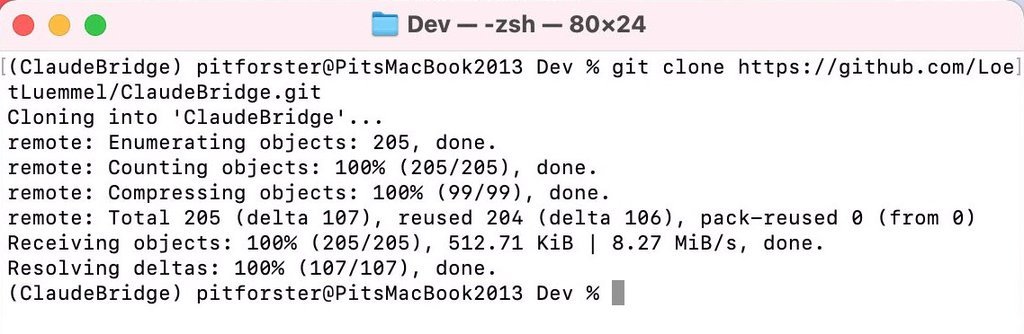
Without git. macOS does not ship git, and there is no reason to install a version control system just to run a Python server:
curl -L -o ClaudeBridge.zip \
  https://github.com/LoetLuemmel/ClaudeBridge/archive/refs/heads/main.zip
unzip -q ClaudeBridge.zip
cd ClaudeBridge-main
The green Code → Download ZIP button on the repository page does the same
thing. The directory is then called ClaudeBridge-main; nothing else differs.
Everything from here on runs inside that directory. A new terminal window
starts in your home directory instead, which is the usual reason a later command
suddenly fails for no apparent reason. pwd tells you where you are.
Step 2 — Dependencies
Three libraries. Everything else is standard library — there is no framework and
no Anthropic SDK; the API call goes through urllib.
| Package | Used for |
|---|---|
PyYAML | reading config.yaml |
beautifulsoup4 | simplifying modern HTML down to 3.2 |
Pillow | converting images to GIF for Netscape |
A virtual environment keeps them out of your system Python:
python3 -m venv .venv
source .venv/bin/activate
python3 -m pip install -r requirements.txt
Naming it .venv inside the directory is worth doing: start_bridge.sh finds
it on its own, and the name cannot be confused with the project directory.
Or, with uv:
uv venv && uv pip install -r requirements.txt
Write python3 -m pip, not a bare pip. Current macOS has no standalone
pip command, and an environment created by uv venv deliberately contains
none either — so pip install fails with command not found even though an
environment is plainly active:

The module form works in every case. A successful run ends like this; Pillow is the only sizeable download at about five megabytes:

soupsieve and typing-extensions come along as dependencies of BeautifulSoup.
Step 3 — The API key
The key does not belong in config.yaml. That file ships with the project,
and a key committed to a repository is a key you have to revoke.
Copy it in the Anthropic console, then paste it straight into place without it passing through the terminal:
mkdir -p ~/.config/anthropic
pbpaste > ~/.config/anthropic/api_key
chmod 600 ~/.config/anthropic/api_key
Avoid echo 'sk-ant-…' > file. It puts the key on screen, into the terminal
scrollback and into ~/.zsh_history, where it stays until you remove it by
hand. That is how keys usually escape — and partially blacking one out in a
screenshot does not help if another screenshot shows a different part of the
same string.
Verify without displaying it:
wc -c ~/.config/anthropic/api_key    # roughly 100-110 bytes
ls -l  ~/.config/anthropic/api_key   # should read -rw-------
Three locations are checked in order: the ANTHROPIC_API_KEY environment
variable, then ~/.config/anthropic/api_key, then a .env file in the project
directory. The first hit wins, and the startup log names it.
Step 4 — Set the emulator to slirp
This is where most installations stall. ClaudeBridge is reachable at
10.0.2.2 — an address that exists only when Basilisk II uses slirp
networking. In bridge mode (etherhelper/…) there is no such address, and the
guest’s browser reports nothing more useful than “could not be loaded”.
A fresh Basilisk II, or one ever configured for AppleTalk or LAN access, is in bridge mode. Set it in the emulator’s preferences under Ports → Ethernet Port, then press Save. Leave Tunnel MacOS networking over UDP unchecked.
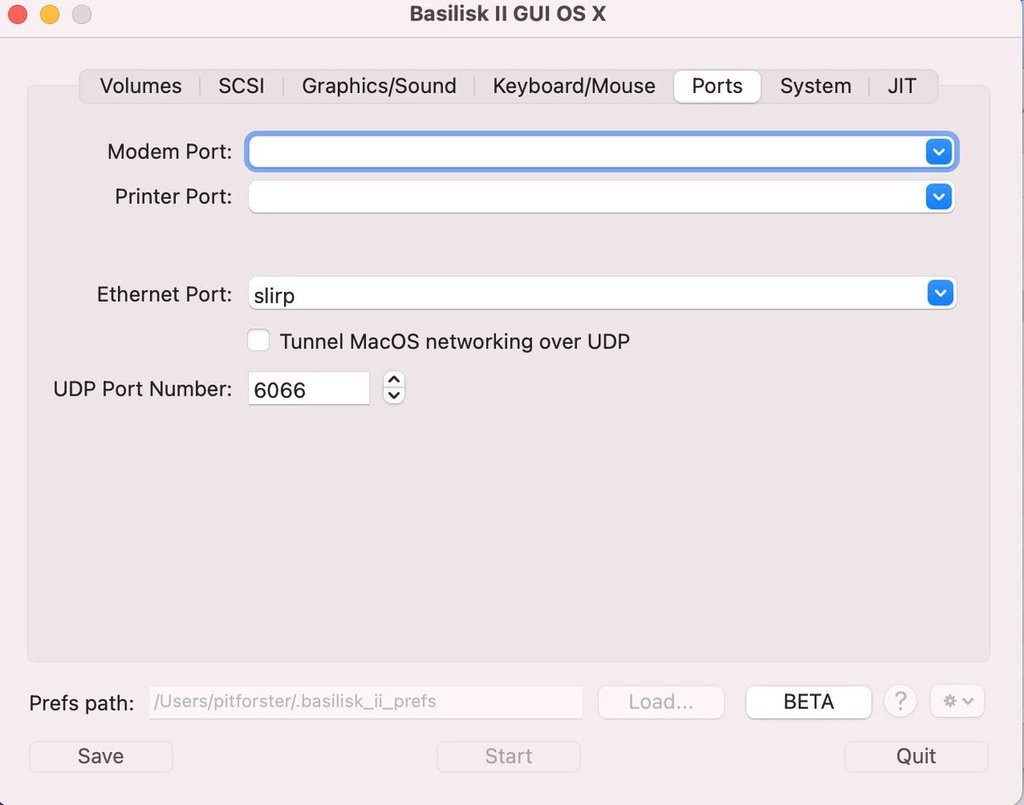
The project ships a command-line equivalent that also backs up the preferences file first and remembers the previous setting, so switching back later restores the exact device:
python3 netmode.py show      # what is set right now
python3 netmode.py slirp     # switch
Either way, restart the emulator afterwards — Basilisk II reads the setting at startup. Shut the guest down cleanly from the Finder rather than killing the process, or the disk image can take damage.
Step 5 — Set TCP/IP on the guest
A mode change has two halves, and this is the one people miss. The emulator now uses slirp, but the guest still holds whatever network configuration it had before.
In the guest: Control Panels → TCP/IP
| Field | Value |
|---|---|
| Connect via | Ethernet |
| Configure | Using DHCP Server |
slirp brings its own DHCP server and assigns 10.0.2.15 to the guest, with the
host reachable at 10.0.2.2. Full details, including the values for going back:
What the 68k Mac Needs.
Step 6 — Start and check
./start_bridge.sh
The script changes no system state, warns if the emulator is not in slirp mode, and prints both addresses:
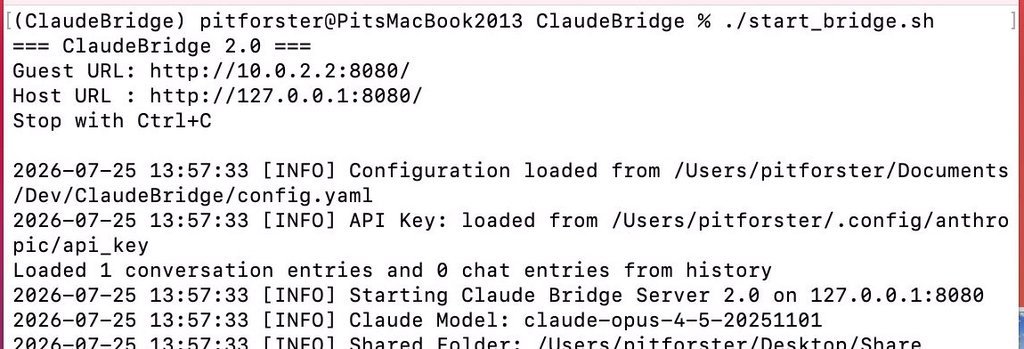
Three lines carry the weight here. No warning about the Ethernet setting
means step 4 took effect. API Key: loaded from … means step 3 did — the
line is absent when no key was found, without any error. And on 127.0.0.1:8080 is the loopback bind that lets the firewall stay on.
On the host:
curl -s -o /dev/null -w '%{http_code}\n' http://127.0.0.1:8080/
# 200
In the guest’s browser: http://10.0.2.2:8080/
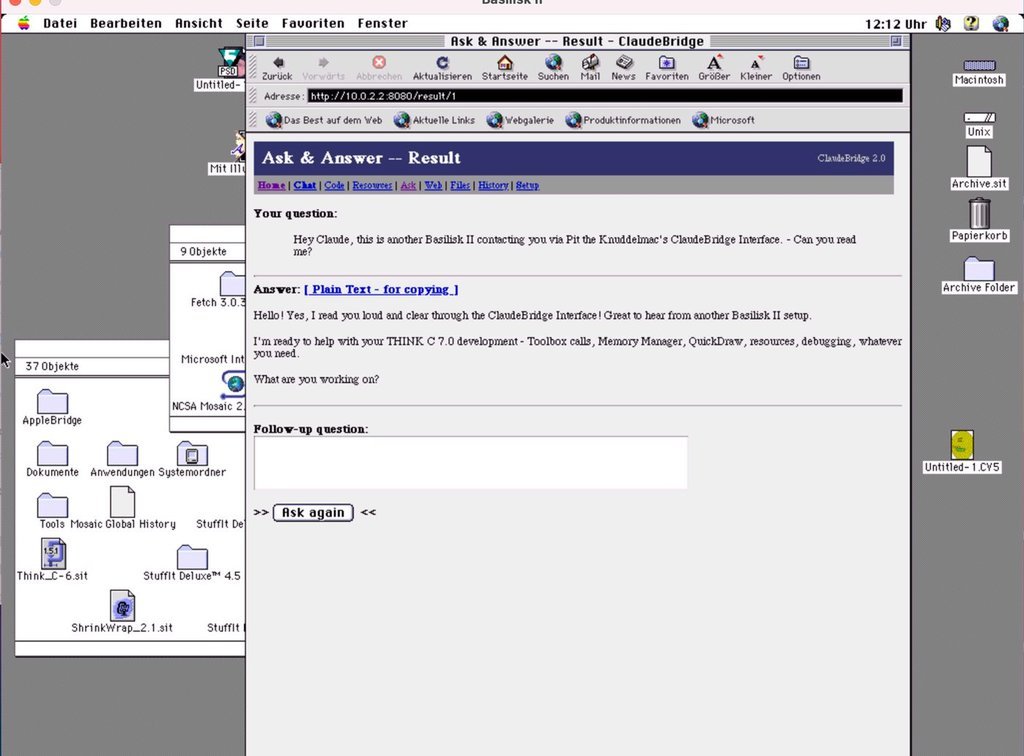
That is the finish line. /setup additionally shows the host configuration and
the current network mode; it is served to loopback clients only, and in slirp
mode the guest qualifies — which is itself confirmation that the routing works.
When something does not work
The guest cannot reach the server, the host can. Two different causes, one
identical symptom. First run python3 netmode.py show: if it reports
etherhelper/…, step 4 has not taken effect — possibly the emulator was not
restarted. If it reports slirp, look at the guest’s TCP/IP control panel:
| IP shown in the guest | Meaning |
|---|---|
10.0.2.15 | slirp is working; the fault lies elsewhere |
192.168.x.x | leftover configuration, set Using DHCP Server |
empty or 0.0.0.0 | no DHCP lease at all |
Refusing to bind 0.0.0.0 — deliberate. ClaudeBridge binds loopback only.
A LAN address would help exclusively in bridge mode, and bridge mode requires
switching the macOS firewall off entirely. Avoiding that trade is the point of
this version. If the guest genuinely has to be reachable on the network, that is
what AppleBridge is for.
ANTHROPIC_API_KEY not set — the key was not found in any of the three
locations from step 3. The startup log names the source it used; if that line is
missing, none of them worked.
ModuleNotFoundError — the environment from step 2 is not active in this
shell, so python3 is the system one without the libraries. Run
source .venv/bin/activate again, or start via ./start_bridge.sh, which picks
up .venv by itself.
Umlauts arrive as question marks — the browser’s character set is not set to
Western. A form is submitted in the encoding of the document it came from, so
this breaks the input path. The full analysis
is worth reading before touching any encoding code.
Do not switch the firewall off. Older instructions for this project did, because the emulator used to sit on the WLAN. In slirp mode it is unnecessary: the guest reaches the host through loopback, which the firewall does not filter.
Updating
With a checkout, git pull. From a ZIP there is no repository — git pull
would answer fatal: not a git repository — so download the archive again.
Your configuration survives either way. The API key lives in
~/.config/anthropic/, outside the project directory.
Optional: run the tests
python3 test_claude_bridge.py # 41 tests, no network needed
They cover path traversal, sanitizing, Netscape-safe escaping, the SSRF filter including its redirect bypass, and the loopback-only bind rule. Worth running once after installation: if they pass, the parts that break silently are intact.