
AppleBridge has spent its whole life talking to an emulator — Basilisk II standing in for a 1990s Macintosh. This is the report of the night it stopped pretending. A real Macintosh SE/30, 32 MB of RAM and an Ethernet card, connected to the host over MacTCP and answered. Along the way, genuine silicon caught a detection bug a thousand emulator runs never could — and the screenshot that proved it is 512×342, a dimension no emulator in this project has ever produced.
The whole point, finally literal
AppleBridge’s north star has always been a sentence: talking to a 30-year-old Mac should feel as dependable as a local shell. For its whole life that “30-year-old Mac” was Basilisk II — a faithful emulator, but an emulator. The architecture, the transports, the installer, the verbs — all of it was built and proven against software pretending to be hardware. The obvious question hung in the air: would any of it survive contact with the real thing?
This session answered it, on a workbench with two physical candidates.
The near miss: a PowerBook Duo 230
The first real machine to run AppleBridge software was a PowerBook Duo 230 — and it is a useful failure. Our THINK C demo, built earlier over the bridge, reached it over AppleShare and ran — concentric Color-QuickDraw rings on genuine 1992 silicon:
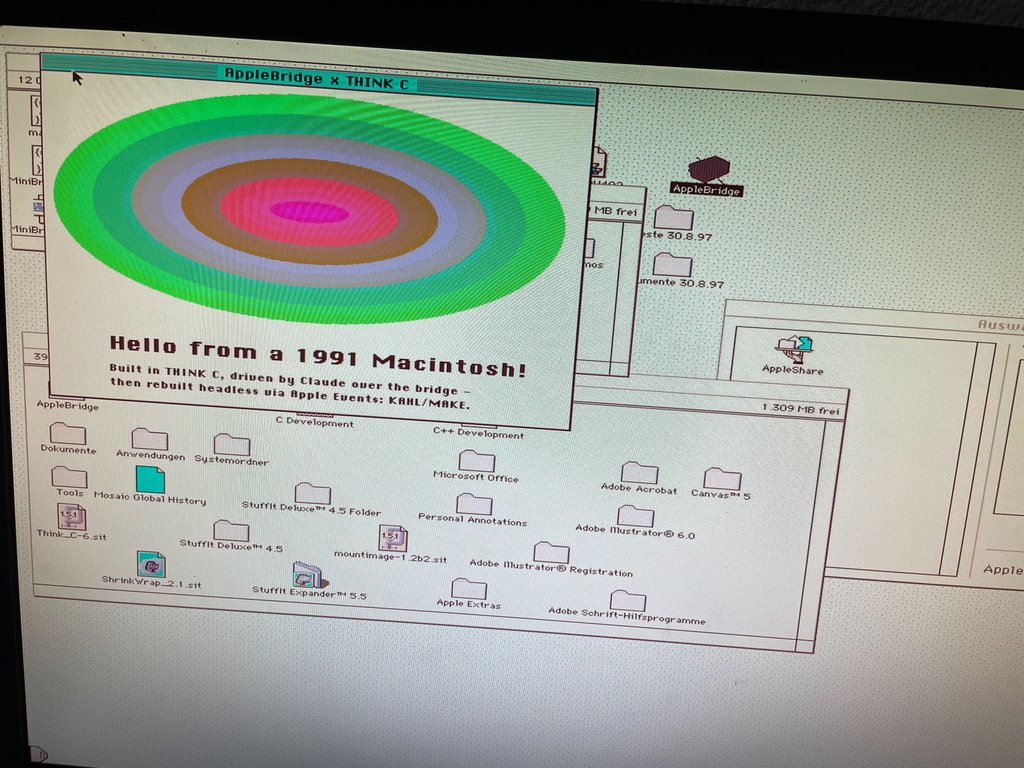
But the daemon would not launch. The Duo has 4 MB soldered and, after the System, roughly 3 MB free — and the bridge wants an 8–12 MB partition plus a TCP stack. The app fit; the service did not. This is the minimum-hardware thesis in the flesh: the CPU was never the floor, memory is. The Duo tops out at 24 MB on a proprietary card it did not have.
So the right machine had to bring more RAM.
The right machine: a Macintosh SE/30
A Macintosh SE/30 — 1989, a 68030 at 16 MHz — but this one carries 32 MB of RAM and an Asante Ethernet card. That changes everything:
- 32 MB is luxurious headroom; the daemon’s partition, the System, and a full TCP stack fit with room to spare.
- A real Ethernet card means the daemon’s defining trick — dial OUT over TCP to the host — is just a socket on the LAN, with none of the emulator’s NAT-reversed contortions.
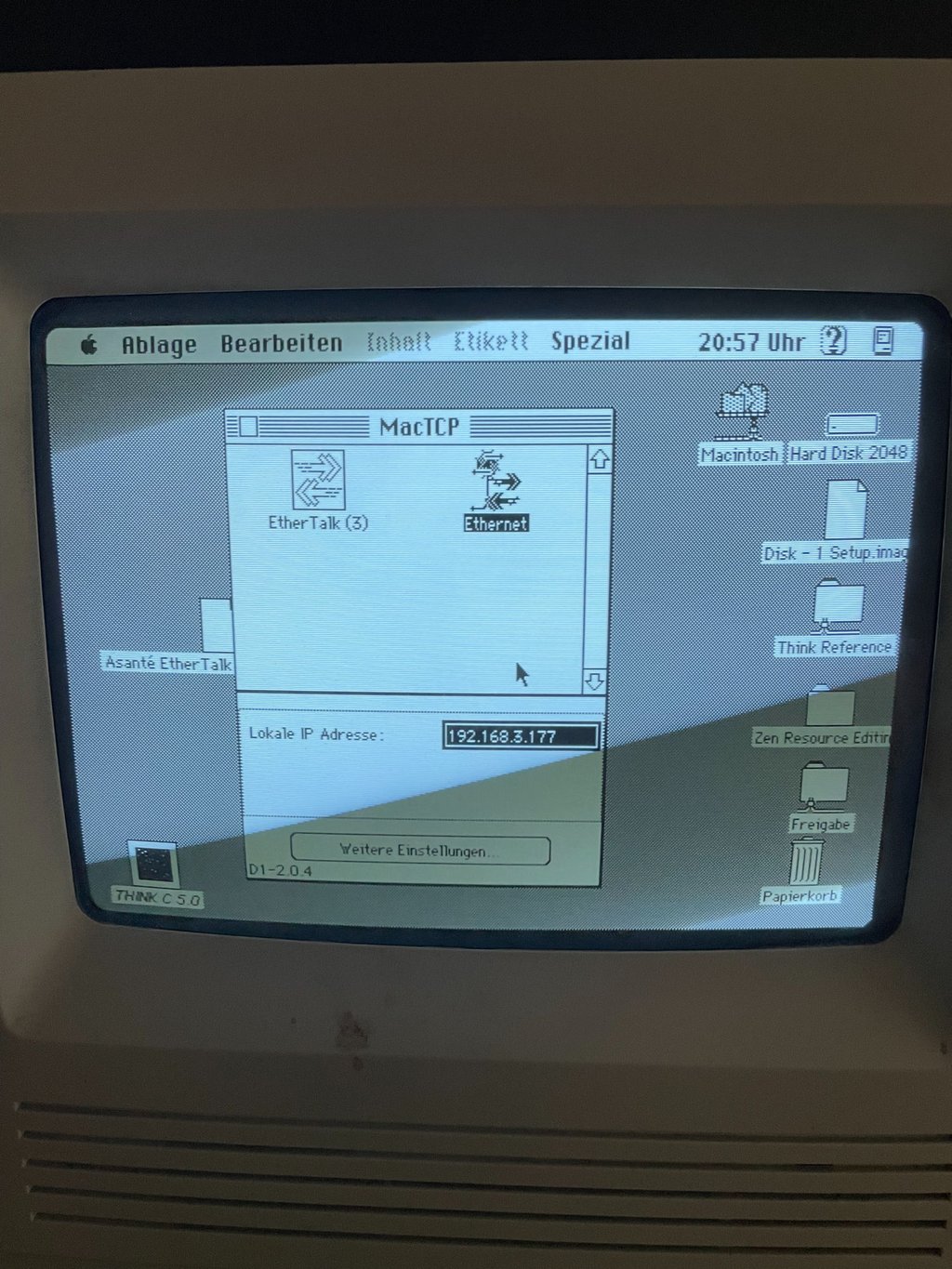
And the transport choice matters here in a way it never did on the emulator. This is exactly what the transport-widening work was for: Open Transport carries a heavier RAM and System footprint than MacTCP, and a compact Mac is precisely the place to spend bytes carefully. The SE/30 runs MacTCP 2.0.4 over the Ethernet card, IP 192.168.3.177:
The installer ran on real silicon — and caught a bug
We built a preflighting 68K installer precisely so installation would refuse a broken environment instead of failing silently at runtime. Watching it run on a real SE/30 was its own small thrill — and it mostly passed: System 7.5 ✓, Apple Events ✓, 32-bit addressing ✓, RAM 32 MB ✓. One check failed:
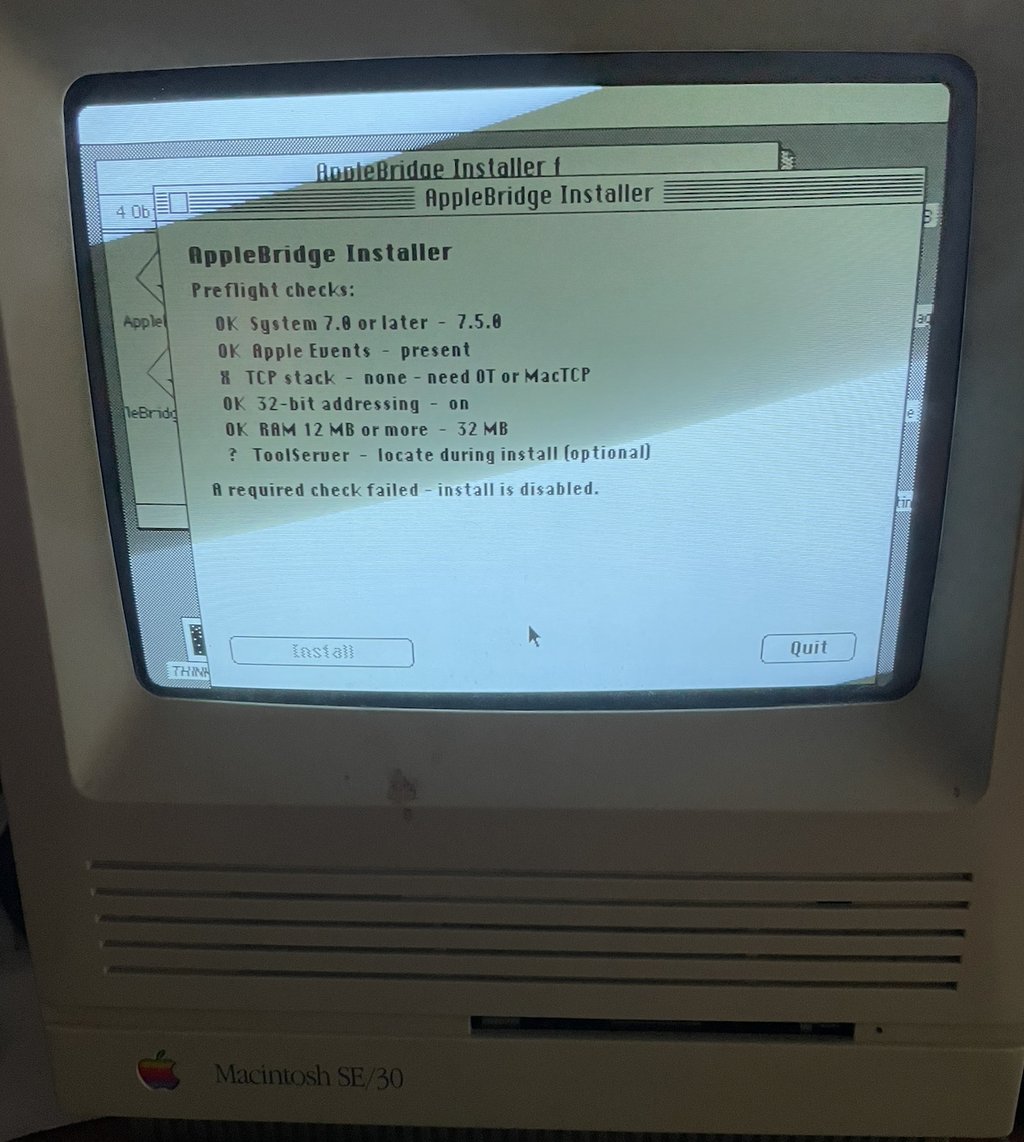
“TCP stack — none — need OT or MacTCP” — on a machine with MacTCP plainly installed and configured. The installer was not lying about a missing stack; it was looking the wrong way.
The preflight detected MacTCP with Gestalt('mtcp'). But classic MacTCP does not register that Gestalt selector — only Open Transport’s MacTCP-compatibility shim does. Every emulator we ever tested ran Open Transport, so the shim registered 'mtcp' and the check passed. A real machine running stock MacTCP has no such shim, so Gestalt('mtcp') returns nothing and a correctly-installed stack reads as absent. The bug was invisible until real silicon with a real classic MacTCP exposed it.
The fix is the probe the daemon already uses (transport_mactcp.c): open the .IPP driver. Classic MacTCP answers OpenDriver(".IPP") whether or not it bothers with Gestalt. One Device-Manager call — no Open Transport dependency — and the preflight sees what is plainly there. That is also why the daemon connected fine while the installer balked: the daemon had been opening .IPP all along.
Past the gate, by hand
With the installer’s gate stuck, we took the side door: AppleBridgeConfig — the control panel, which has no preflight — set the host IP and selected the MacTCP transport. Autostart would not install (it needs the install location the Installer writes, which we had bypassed — a rough edge to file), but autostart is only for unattended boot. For first contact, the daemon was launched by hand. It read the prefs, opened .IPP, and dialed.
flowchart LR
    SE["Macintosh SE/30
System 7.5 · 32 MB · MacTCP 2.0.4"]
    DRV[".IPP driver
daemon MacTCP backend"]
    ETH["Asante Ethernet
192.168.3.177"]
    HS["host_server.py
port 9000"]
    CL["Claude · MCP tools"]
    SE --> DRV --> ETH
    ETH -->|"TCP — daemon dials OUT"| HS
    HS -->|"mac_status · mac_screenshot"| CL
    CL -->|"verbs"| HS
SYNC-OK
The daemon’s Verbose console, on the SE/30’s own 9-inch screen, printed the only three lines that matter:
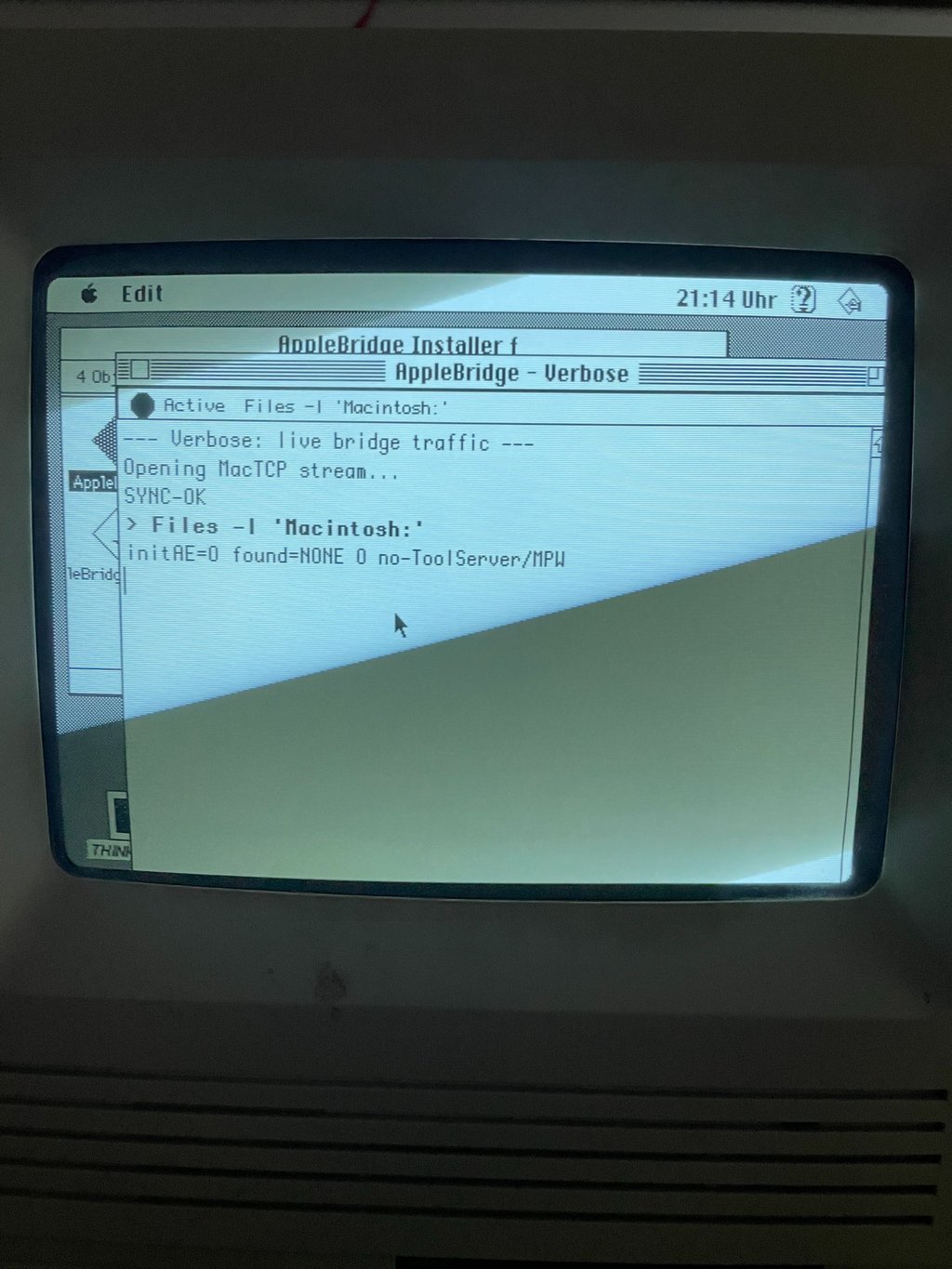
--- Verbose: live bridge traffic ---Opening MacTCP stream...SYNC-OK
Our MacTCP backend, opening a stream and completing the handshake, on a 1989 Macintosh, over real Ethernet.
Proof, three ways
Skepticism is healthy — every machine this session ran the same demo, so “it looks connected” proves nothing. Three independent facts do:
net=MacTCP. Every emulator all project reportednet=OT. This daemon reports MacTCP — the stack we set on the SE/30, and the one no emulator used.- A fresh connection.
uptime=21sat the moment of the launch;toolserver=0, as expected on a machine without MPW. - A 512×342 framebuffer.
mac_screenshotreturned a capture 512 pixels wide, 342 tall — the exact dimensions of the SE/30’s built-in 1-bit display. Every emulator screenshot this project has ever taken was 1024×768 in colour. Basilisk II cannot produce 512×342; only the physical 9-inch CRT can. The agent was, literally, reading the screen of a real Macintosh SE/30 over the wire.
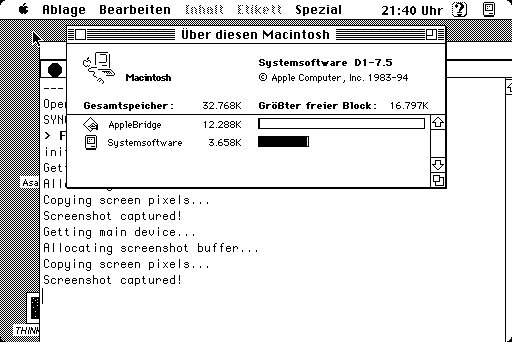
This one is not a photograph. Where the figures above are phone snapshots of the CRT, this is the screen itself — the raw framebuffer the daemon streamed over MacTCP, decoded to a PNG host-side: 512×342, 1-bit, the SE/30’s real display exactly as the agent reads it over the wire.
What it means, and what is still rough
The headline is simple: AppleBridge runs on real hardware. Not a faithful simulation of a 30-year-old Mac — the Mac. And the pieces that carried it were the unglamorous ones built over months: a transport seam with a lean MacTCP backend sized for exactly this RAM budget; a preflighting installer whose one failure was itself the most valuable thing real silicon could return; and a daemon that dials out the same way whether the wire is emulated or copper.
It is also a quiet vindication of a long-ago purchase: the daemon spends about 12 MB, and that headroom existed only because the machine had been fitted, years earlier and for no particular reason, with a full 32 MB. Some hardware just waits for its moment.
Honest loose ends, because real hardware earns honesty:
- The SE/30 currently runs an older daemon — it has MacTCP and status but predates the native
LISTDIRverb, so directory listings still fall through to a ToolServer that is not there. The next job is to deploy the current daemon (withLISTDIR, and the verbose-logging fix so the console narrates every verb, not just commands). - The installer’s
.IPPfix is written but not yet rebuilt and shipped. - AppleBridgeConfig’s autostart silently assumes the Installer ran first — it should either stand alone or say so.
- The daemon’s RX/TX health LEDs are colour-coded (green for receive, red for transmit) — and therefore meaningless on the SE/30’s 1-bit monochrome screen, where both render as plain black. One more assumption from the colour-display emulator era that real silicon quietly invalidates; on a compact Mac they need a shape or fill-pattern encoding to carry any meaning.
None of that dims the result. A workbench, a 1989 compact Mac, 32 MB and an Ethernet card, and a sentence that stopped being a metaphor: talking to a 30-year-old Mac felt exactly like a local shell.
Field report. The SE/30 connected live over MacTCP and Ethernet and answered mac_status and mac_screenshot; the 512×342 captures are the machine’s physical display. Companion to the THINK C demo (the app that reached hardware first), the MacTCP transport (the backend that carried it), and the minimum-hardware and installer notes, whose predictions this run tested in the flesh.