
The same Macintosh SE/30 has now answered AppleBridge two ways: over a serial cable at 57600 baud, and over MacTCP on Ethernet. With the Open-Transport-fallback bug fixed, the network path works again — so this is the head-to-head, plus a first: driving the machine’s own GUI (mouse and menus) remotely over the fast link.
How both links came to exist
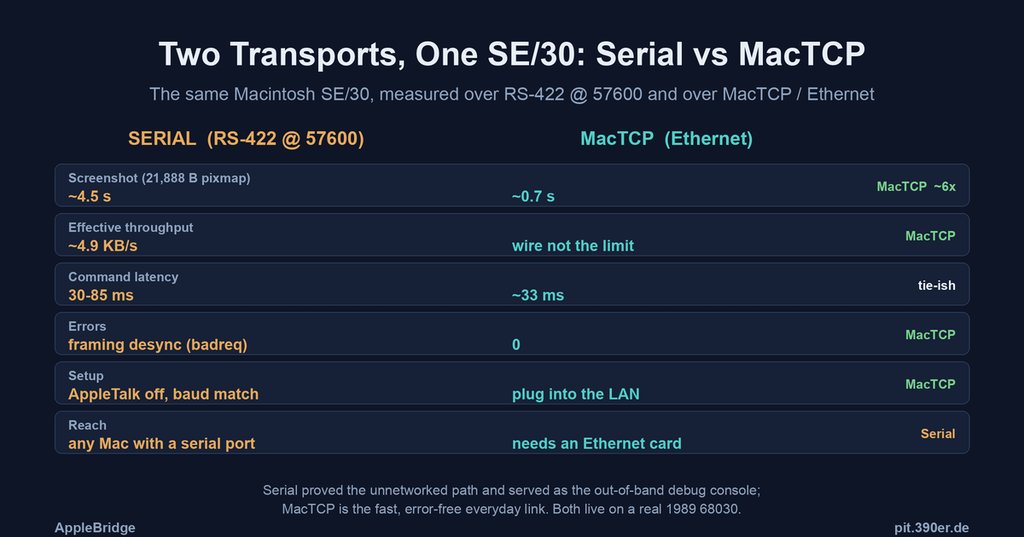
Serial was built as the path for a Mac with no network, and along the way it earned a second job: an out-of-band debug console. When the network stack was crashing, serial was the reliable channel that stayed up — the “serial console” of classic-Mac debugging. MacTCP is the everyday link when there is a network: this SE/30 has an Asante Ethernet card and classic MacTCP, and once a latent Open-Transport-fallback bug was fixed (the daemon was calling OT traps on a machine with no OT, faulting with Error 11), it dials the host over TCP and answers clean.
The numbers
Both were measured on the same machine, same daemon, only the transport changed.
| Metric | Serial (RS-422 @ 57600) | MacTCP (Ethernet) |
|---|---|---|
| Screenshot (21,888-byte pixmap) | ~4.5 s | ~0.7 s |
| Bulk file transfer | ~4.9 KB/s (the wire) | ~218 KB/s (1.7 MB, sustained) |
| Command latency | 30–85 ms | ~33 ms |
| Errors | framing desync (badreq, stale-byte drains) | 0 |
| Setup | AppleTalk off, baud match, cable wiring | plug into the LAN |
| Reach | any Mac with a serial port | needs an Ethernet card |
Latency for small commands is a near tie (both are gated by the guest’s cooperative-scheduler tick, not the wire), but errors are the decisive difference — TCP’s ordering and retransmit erase the entire serial frame-desync class: 0 versus a steady trickle of badreq.
Expected vs. experienced throughput
It’s worth separating the wire from the machine. The SE/30’s Asante card is 10BASE-T — 10 Mbps, about 1.25 MB/s of raw Ethernet. But a 16 MHz 68030 cannot saturate that: classic MacTCP copies every byte through its own buffers under the daemon’s cooperative scheduling, so the CPU, not the cable, is the ceiling. A transfer-dominated measurement bears it out — pulling a 1.7 MB file took 7.6 s: ~218 KB/s sustained, about 1.7 Mbps of the 10 Mbps wire (~18%). A smaller 382 KB file actually clocked slightly higher (~248 KB/s), so this isn’t TCP slow-start — it’s the steady state: a few hundred KB/s across file sizes, CPU-bound, exactly where a 68030 TCP stack has always lived.
Which reframes the screenshot number. The ~0.7 s screenshot is only ~31 KB/s end-to-end — slower than the bulk transfer — because it is capture-bound, not transfer-bound: the daemon spends most of that 0.7 s reading the 1-bit screen with CopyBits, and the 21,888-byte pixmap itself crosses the wire in under 100 ms. So the transport is comfortably faster than any single screenshot implies.
Against serial the contrast is structural: serial’s ~4.9 KB/s was the wire (a hard 57600 ceiling at 84% utilisation — there was nothing left to give), whereas MacTCP’s ~248 KB/s is the CPU — about 45× the serial bulk rate, and a figure that would climb further on a faster 68k or an accelerated SE/30. Serial had no headroom; MacTCP’s headroom is the processor.
Driving the GUI over the fast link
The reliable link made something new practical: driving the SE/30’s own Finder — mouse and menus — remotely. Over the flaky serial link the daemon was often starved; over MacTCP synthetic input lands crisply. The task: read the disk’s real size, which the headless connectivity tier (LISTDIR/PBGetCatInfo) can’t compute.
The sequence, all injected from the host:
- Click an empty desktop strip → the Finder comes forward (full German menu bar: Ablage · Bearbeiten · Inhalt · Etikett · Spezial), revealing the desktop.
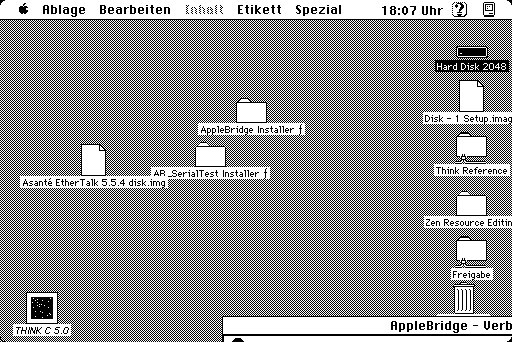
- Click the
Hard Disk 2048icon to select it. - ⌘-I (Information / Get Info) — a keyboard menu command, which the front app dispatches through
MenuKey(the reliable path; a synthetic click can’t drive a menu’s mouse-tracking loop).
And the Get Info window opened, on real silicon, over Ethernet:
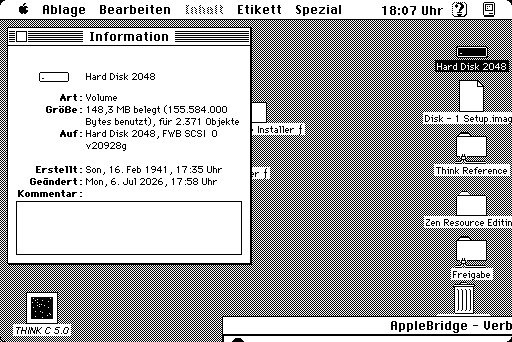
Größe: 148,3 MB belegt (155,584,000 Bytes), für 2.371 Objekte — the true used space and object count, on an FWB-driven SCSI disk. That is far beyond the ~14.6 MB lower bound the headless directory walk could establish: the GUI simply displays what the File Manager knows, and now we can read it remotely.
Two honest edges surfaced, both now on the backlog:
- Double-click needs guest-side timing. Opening the disk window (double-click) didn’t register: the daemon posts both clicks locally, but with a fixed inter-click gap that can exceed
GetDblTime()when the Mouse control panel is set fast, so the Finder sees two singles. The fix is to size the gap to a fraction ofGetDblTime()— the gesture must be timed on the guest, never assembled from separate host pokes. - The Verbose window covers the desktop. The daemon’s on-screen log sat over the icons; a hide/show toggle (or auto-hide when a click targets the desktop) would make GUI-driving cleaner.
Verdict
They are not rivals; they are two rungs. Serial is the floor — it reaches a Mac with nothing but a port, and doubles as the debug console when the network itself is the thing under repair. MacTCP is the everyday link — ~45× faster on bulk, error-free, and set up by plugging into the LAN — and fast enough that remote GUI driving (mouse, menus, Get Info) becomes routine. Both now run on the same real 1989 68030.
All figures measured live on a Macintosh SE/30 (System 7.5): serial over RS-422 at 57600 baud, MacTCP over an Asante Ethernet card, same daemon, same host. The bulk-throughput figure is a timed ~382 KB file read; the GUI was driven entirely by injected mouse-clicks and ⌘-key menu commands over MacTCP; the disk figures are the Finder’s own Get Info, read from a host-side screen capture.