
A 1994 integrated development environment has no command line. THINK C++ (Symantec C++ 7.0) is a Macintosh application whose compiler is reachable only through menus, dialogs and a project window: there is no cc to invoke and no makefile to run. This article is a complete, reproducible walkthrough of driving that environment from outside the machine — over the AppleBridge link — to compile and run a Color QuickDraw graphics demo written in C++ on a Macintosh running System 7.6.1 under Basilisk II.
Every step below is shown as it appeared on the emulated screen. The technique generalises: an application’s Apple Event dictionary is an automation surface even when the application was never designed to be automated, and the boundary of that surface can be identified in advance.
Why this is not a normal build
AppleBridge already drives MPW and ToolServer, which are scriptable by construction — text in, text out. THINK C++ is the opposite case, and the two obvious approaches both fail.
Synthetic event injection — posting mouseDown and keyDown records into the guest’s event queue — fails against exactly the parts that matter. The classic Toolbox tracking loops (MenuSelect, ModalDialog, and the Standard File dialogs built on them) do not consume queued events; they poll the hardware mouse position directly. A synthetic click is invisible to a menu or a file dialog.
Full screen-scraping — driving every step by simulated gestures — works but encodes pixel coordinates for every dialog and breaks silently on any layout change.
The approach used here is a division of labour across three channels:
| Channel | Used for |
|---|---|
| File transfer | placing source on the guest (UTF-8/LF → MacRoman/CR) |
| Apple Events | everything in the application’s dictionary — the entire build and run cycle |
Real mouse (cliclick) | only modal tracking loops the other channels cannot reach |
Step 0: Discover that the IDE is scriptable
The decisive step happens before any automation is written, and costs one command. Dump the application’s Apple Event terminology resource:
DeRez -only 'aete' "MeinMac:Development:Symantec C++ for Macintosh:THINK Project Manager"
It returns a full THINK Suite alongside the Required and Standard suites:
| Event | Code | Purpose |
|---|---|---|
| build | KAHL/MAKE | “Much like TPM’s Bring Up to Date and Make commands” |
| compile | KAHL/CMPL | compile one source file |
| run | KAHL/RUN | run the current project |
| check syntax | KAHL/SNTX | syntax-only pass |
| check link | KAHL/LINK | resolve symbols |
| precompile | KAHL/PCMP | precompiled headers |
| disassemble | KAHL/DASM | emit assembly |
The suite also exposes the project object model — SFIL (source entry), PSEG (code segment), OCOD (object code) — with standard create, delete, count and get verbs.
Crucially, run takes a null direct object: it acts on the current project. That sidesteps the hardest part of remote Apple Event control, namely building object specifiers or alias records for a document across a text-carrying bridge.
Step 1: Create the project from a model
Symantec ships project models — stationery intended to be duplicated. The C++ Project model is the right base: it uses main.cp, THINK’s C++ extension.
P='MeinMac:Development:Symantec C++ for Macintosh:Projects:GfxDemo:'
M='MeinMac:Development:Symantec C++ for Macintosh:(Project Models):C++ Project:'

send_command.py "NewFolder \"$P\""
send_command.py "Duplicate -y \"${M}@1.π\" \"${P}GfxDemo.π\""
Step 2: Convert and deploy the source
Text must be converted host-side — UTF-8 to MacRoman, LF to CR — before it is copied in:
encoding_convert.py to-share main.cp
send_command.py "Duplicate -y Unix:main.cp \"${P}main.cp\""
send_command.py "SetFile -t TEXT -c KAHL \"${P}main.cp\""
(There is a defect lurking in this step. It surfaces at Step 9.)
Step 3: Launch the IDE
launch_app(path="MeinMac:Development:Symantec C++ for Macintosh:THINK Project Manager")
THINK Project Manager opens directly into a Standard File dialog asking for a project — the first tracking loop, and therefore the first job for the mouse channel.
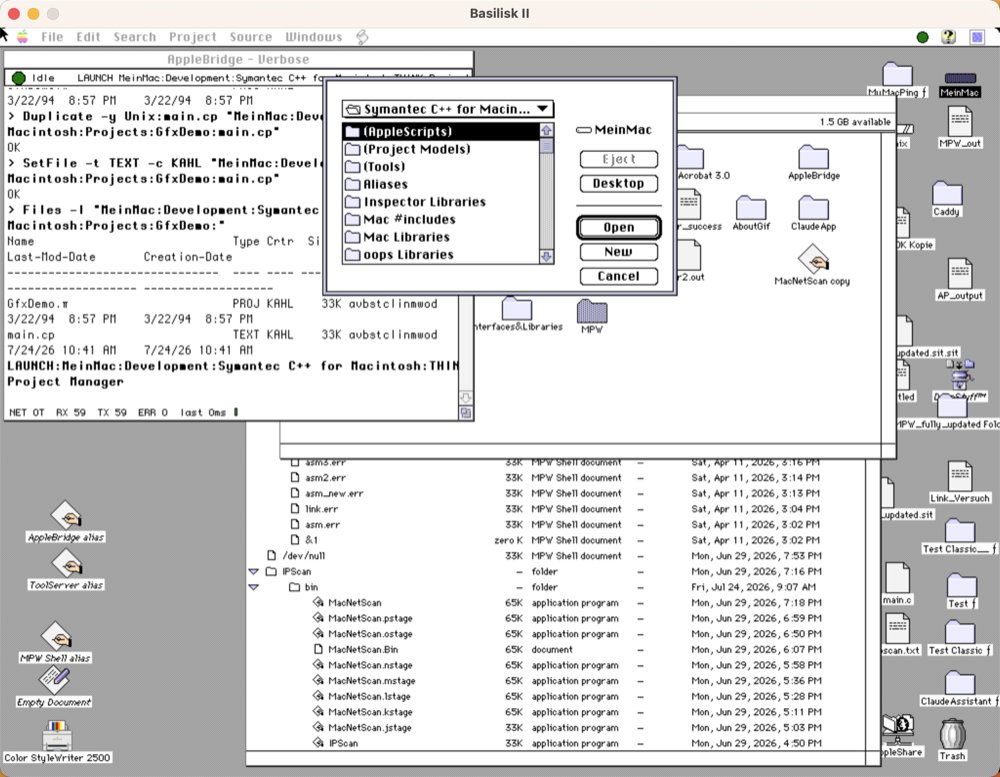
Step 4: Navigate to the project
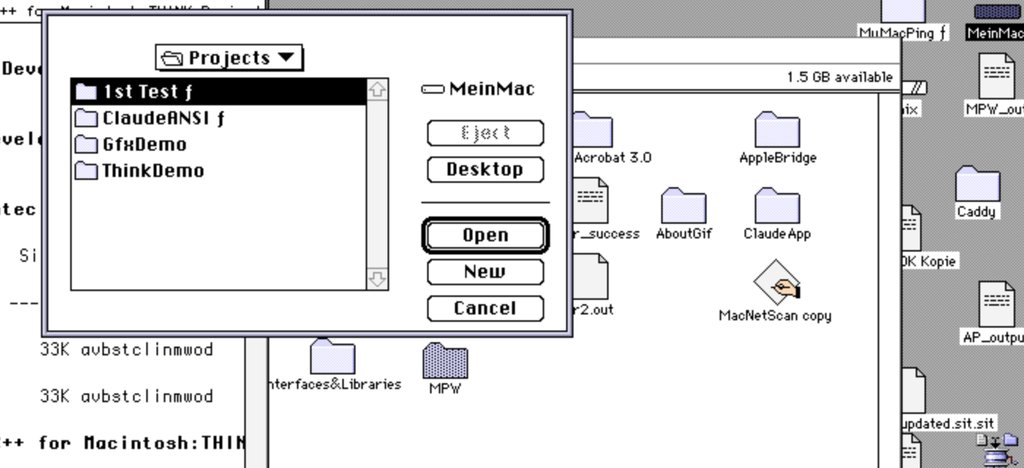
Standard File supports keyboard type-selection, and real keystrokes reach it even though synthetic ones would not:
cliclick w:300 t:Projects w:400 kp:return
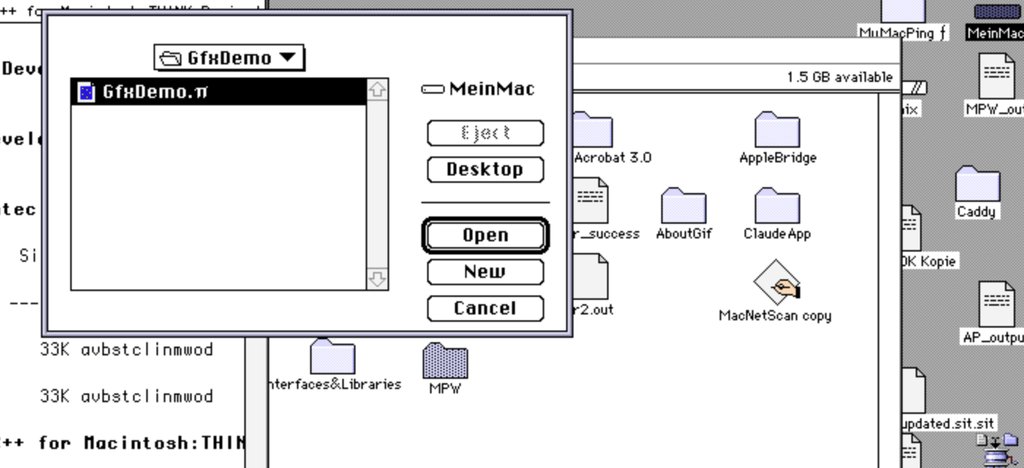
Repeating for the project folder shows the single project file, already selected:
Step 5: Open the project
Pressing Return opens it. The model’s internal reference to main.cp resolves to the sibling file placed in Step 2 — which is precisely what project models are for.
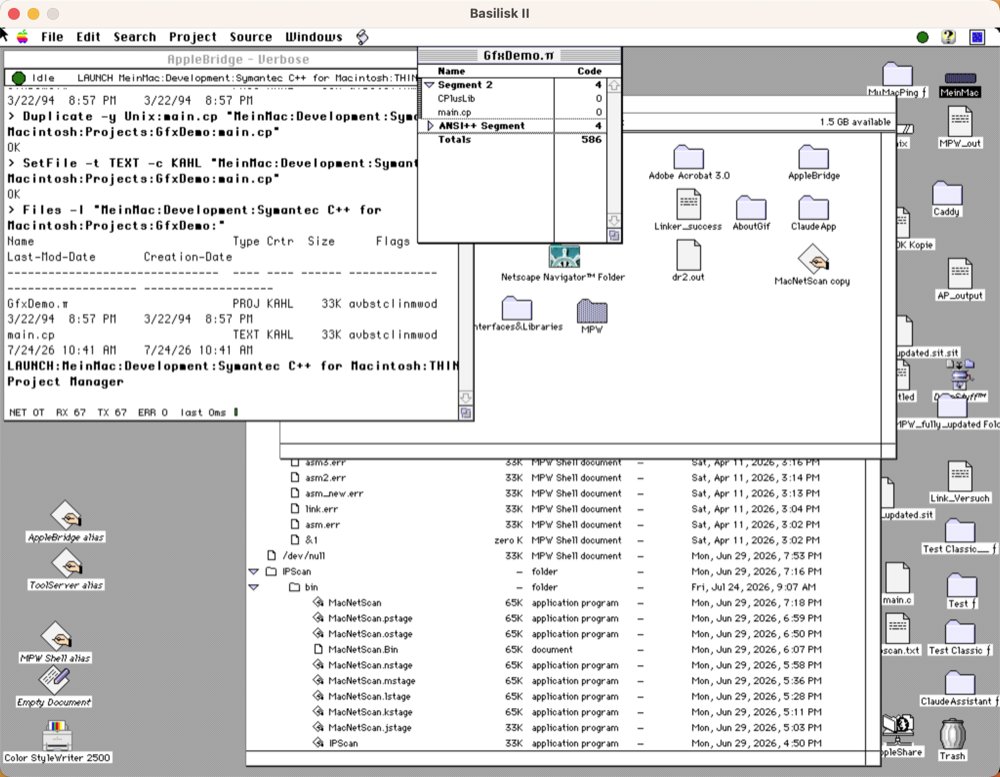
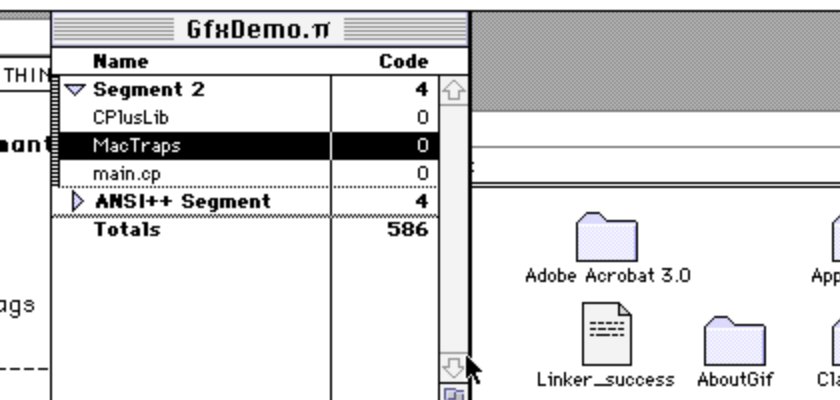
Note what is present and what is missing: CPlusLib (the C++ runtime) and ANSI++ come with the model, but MacTraps does not. Without it no Toolbox call resolves — no window, no QuickDraw, nothing.
Step 6: Open the Source menu — press and hold
System 7 has no sticky menus. Clicking a menu title and releasing closes it again. The reliable sequence is: press and hold, capture the screen while the menu is down to read item positions, then move and release on the target.
cliclick m:704,165 dd:704,165      # press and HOLD
# ... screenshot, locate the item ...
cliclick m:720,200 du:720,200      # move, then release on it
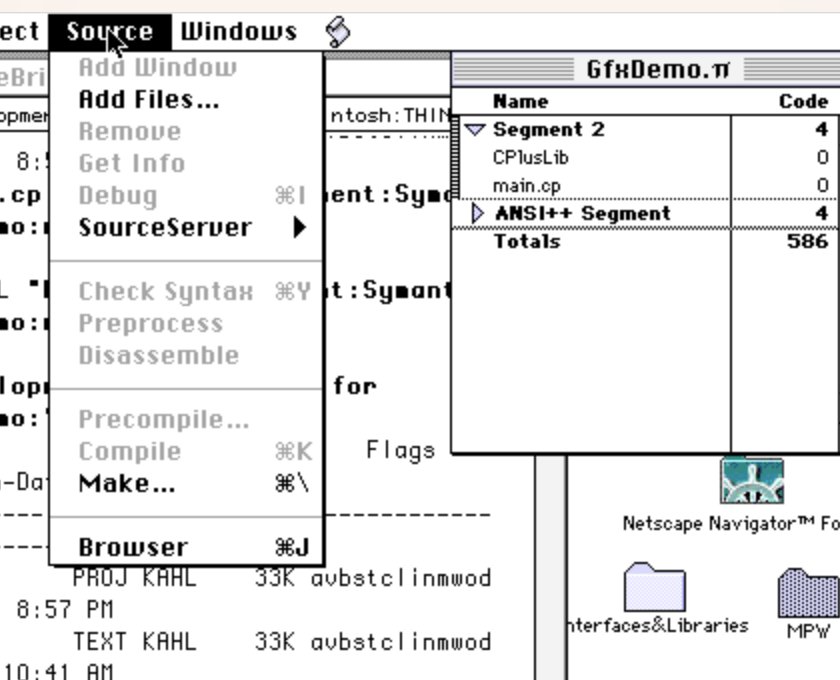
This screenshot is taken with the mouse button still down — which is the only moment the menu exists to be measured.
Step 7: The Add Files dialog
Releasing on Add Files… opens a second Standard File dialog, showing the project folder (empty, because main.cp is already in the project):
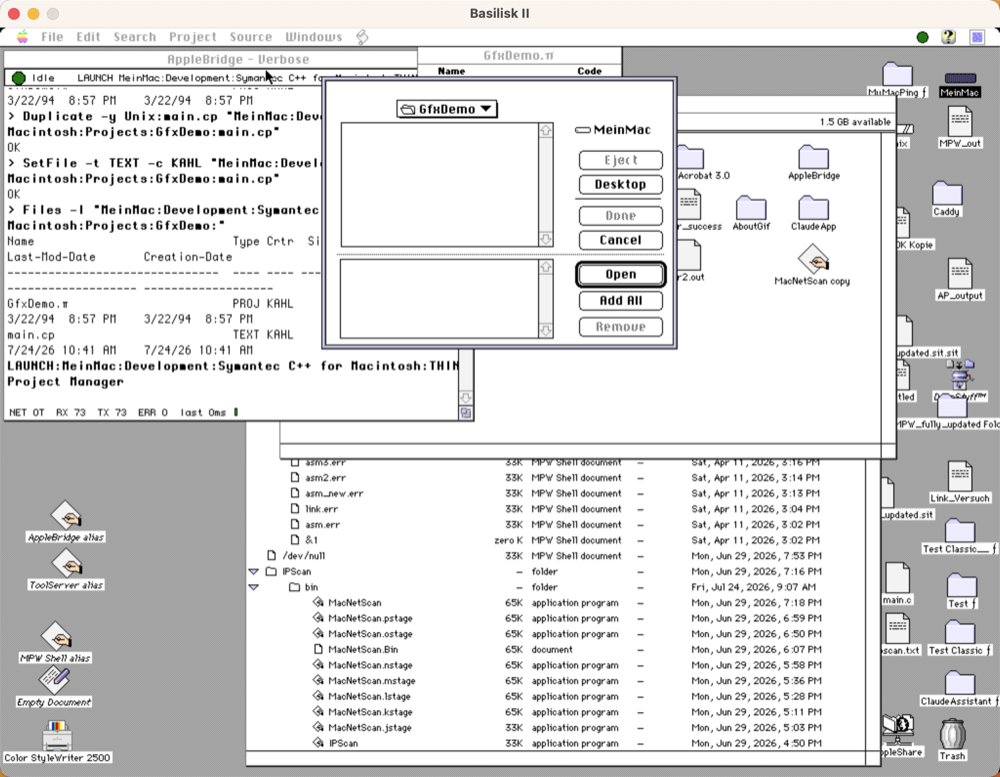
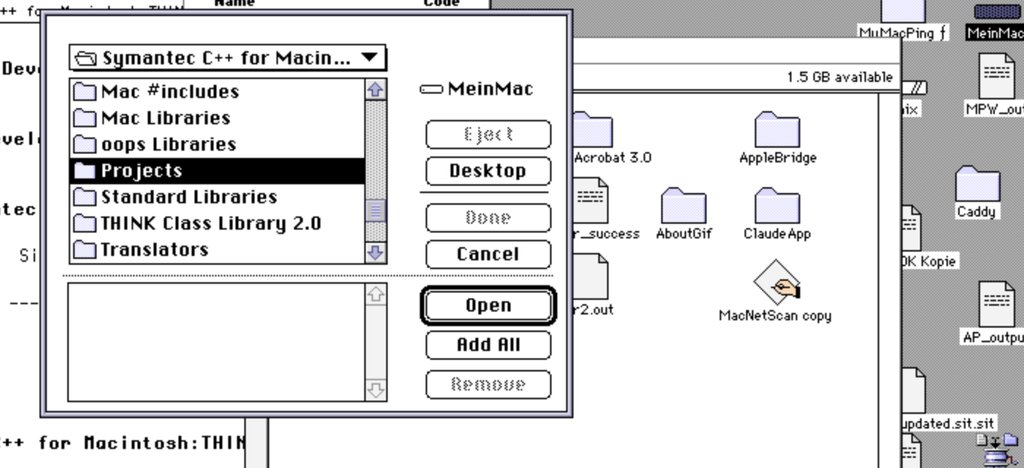
Navigate up two levels with Cmd-Up, which System 7’s Standard File supports:
cliclick kd:cmd kp:arrow-up w:500 kp:arrow-up ku:cmd
Step 8: Where type-selection breaks
Type-selection handled Projects and GfxDemo cleanly, but failed on a name containing a space. Typing Mac Libraries did not navigate; the selection reset mid-word and landed on oops Libraries:
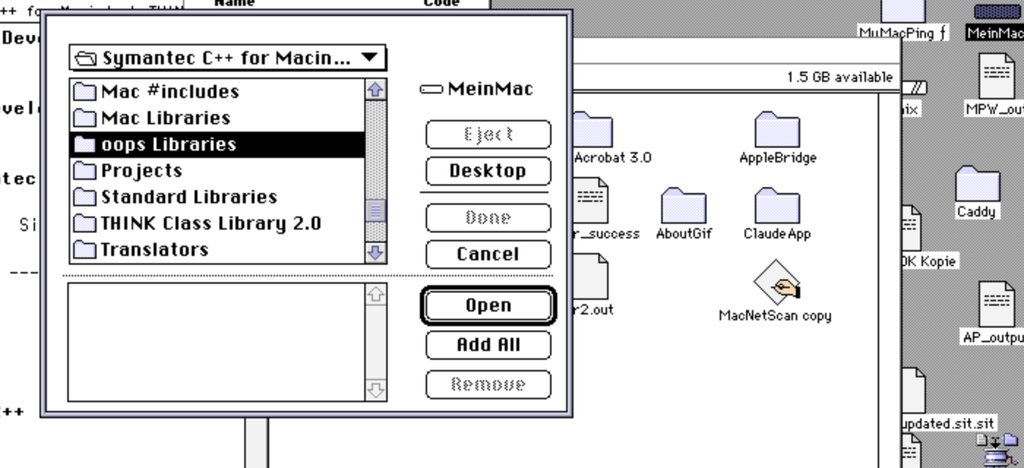
The deterministic alternative is a double-click on the list entry — worth knowing before automating any Standard File navigation:
cliclick m:850,281 w:300 dc:850,281
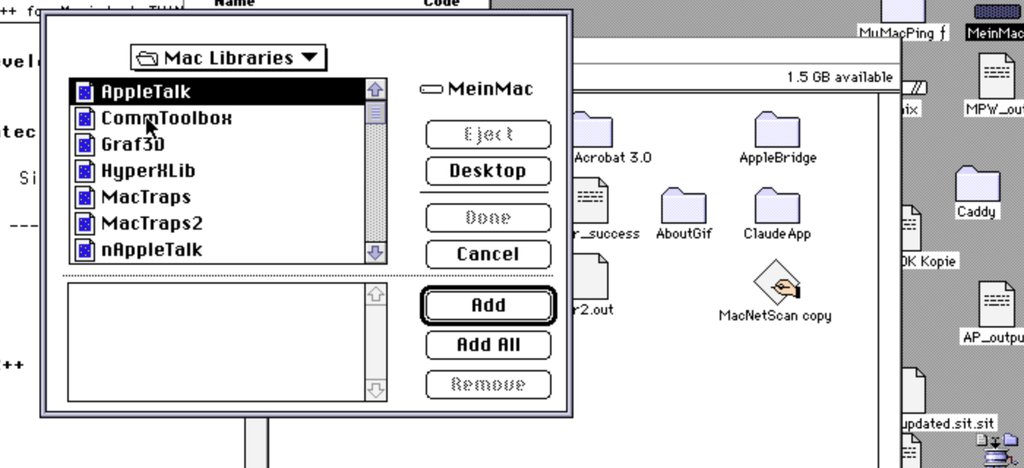
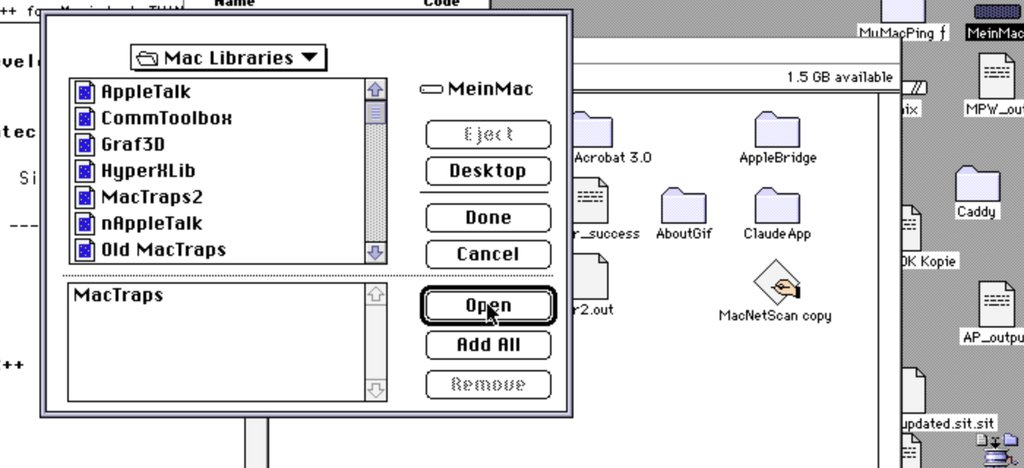
Select MacTraps, click Add, and it moves to the staging list at the bottom while Done becomes enabled:
The project now has all three components — the C++ runtime, the Toolbox glue, and the source:
Step 9: Build — and a transfer defect
From here the mouse is no longer needed. The build is one parameterless Apple Event:
mac_send_apple_event(target_creator="KAHL", event_class="KAHL", event_id="MAKE")
The libraries compiled, but the source failed with a single diagnostic:
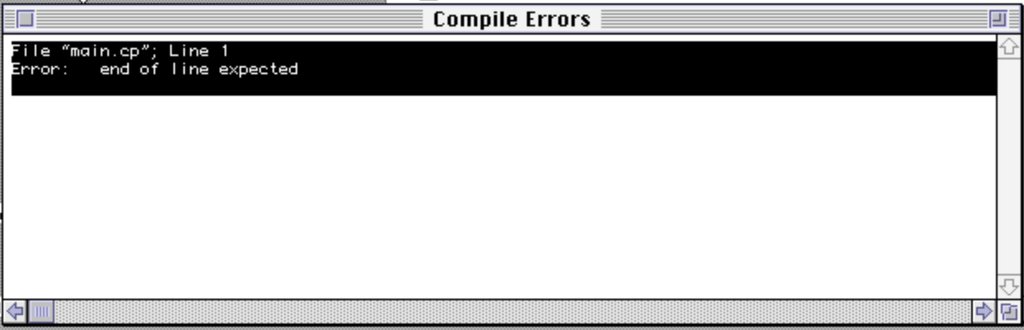
Line 1 for a file whose first line is /* is characteristic: the compiler is seeing the entire file as one line. The cause was on the host, not the guest. encoding_convert.py decides whether to translate by file extension, and its TEXT_EXTENSIONS set listed .c, .h, .r, .a, .p — but no C++ extension at all. The .cp file was copied verbatim, keeping its LF terminators, and a classic-Mac compiler expecting CR saw a single nine-kilobyte line.
The check is immediate:
$ tr -cd '\r' < main.cp | wc -c      # 0    <- no CRs
$ tr -cd '\n' < main.cp | wc -c      # 330  <- all LFs
The fix extends the set with .cp, .cpp, .cxx, .cc, .hpp, .hxx. After re-conversion the same check reported 330 CR and 0 LF, and the em dash in the header had become MacRoman 0xD1.
This failure is worth recording because it is silent at transfer time: the copy succeeds, the file looks correct in a directory listing, and only the compiler reveals the damage — with a message pointing at line 1 of an ordinary comment.
Step 10: Build again
Re-deploy and re-issue the same event. This time it compiles and links:
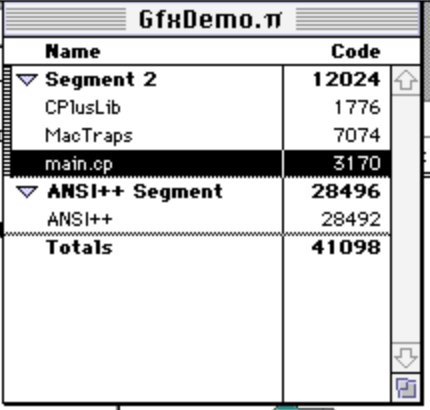
main.cp produced 3170 bytes of object code against MacTraps (7074), CPlusLib (1776) and ANSI++ (28492) — 41098 bytes total.
Step 11: Run it
mac_send_apple_event(target_creator="KAHL", event_class="KAHL", event_id="RUN")
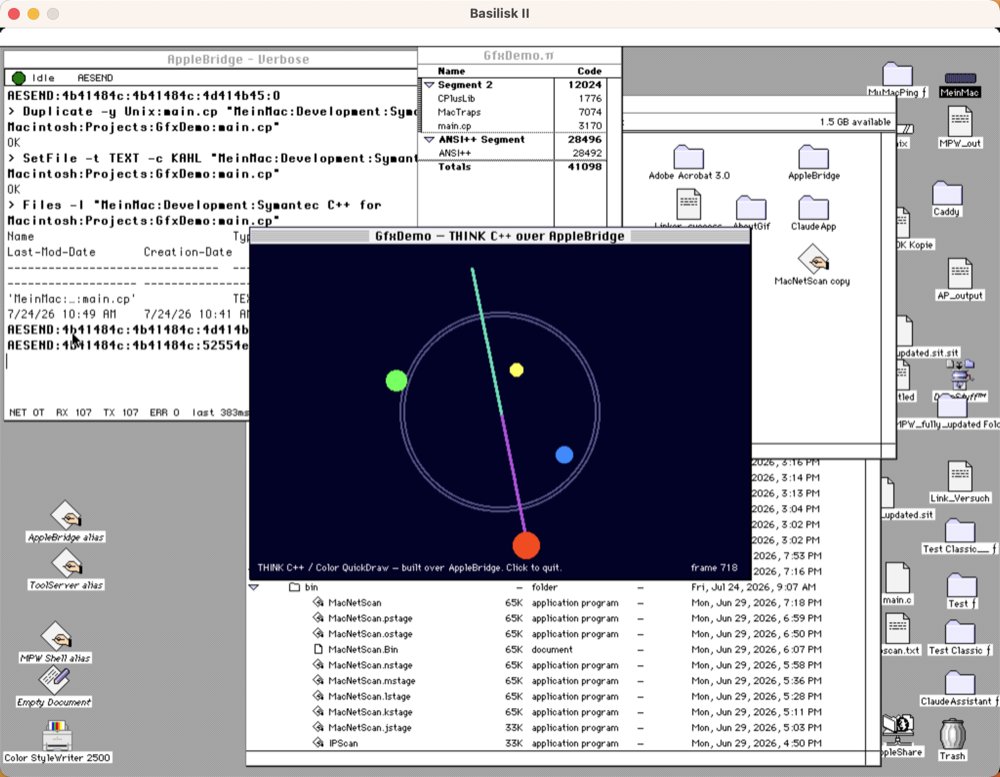
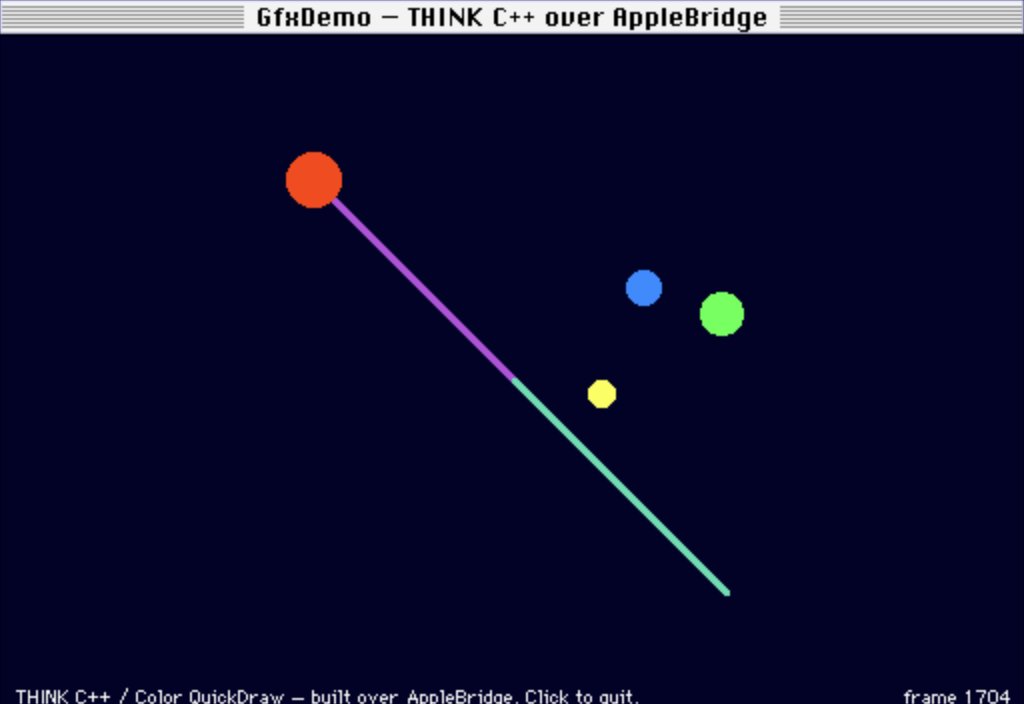
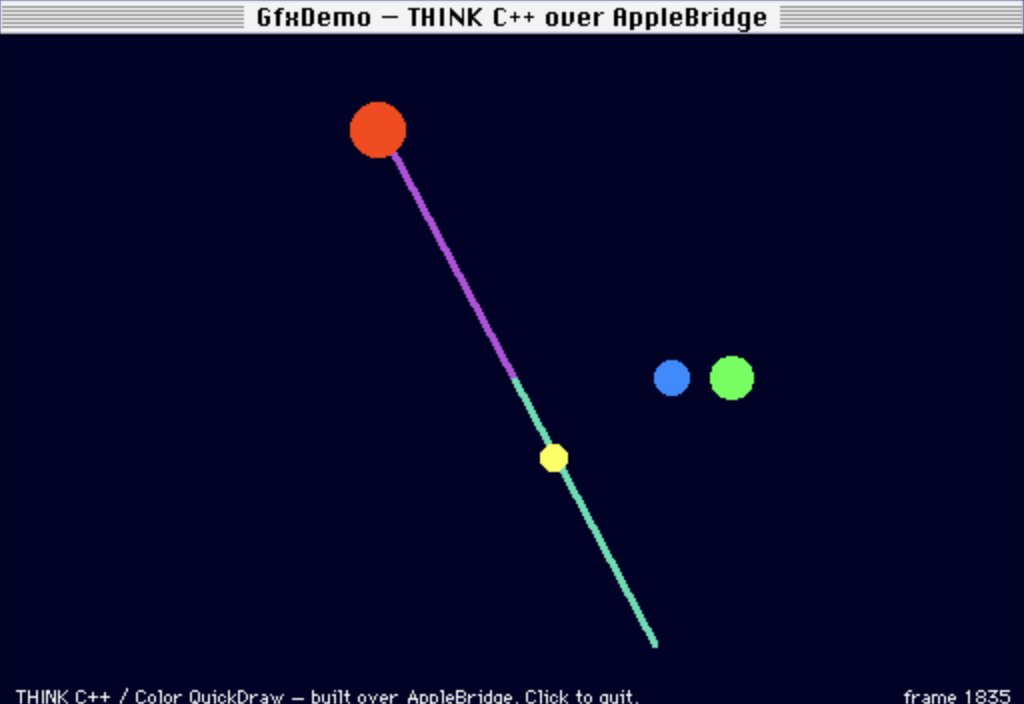
This screenshot is the substantive result, because of the background rather than the foreground. While the demo animates, the AppleBridge console keeps reporting traffic with an error count of zero — the program and the bridge that built it coexist. A liveness query during the run returned rx=110, err=0.
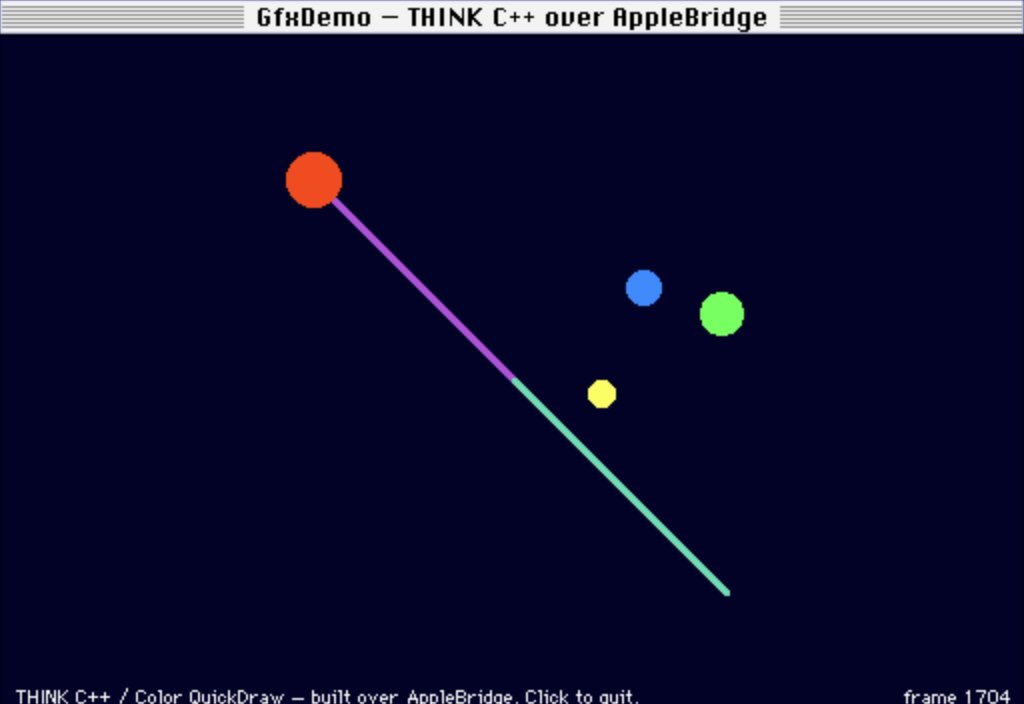
Two captures three seconds apart confirm the animation is live, the frame counter advancing from 1704 to 1835 with every element displaced:
The program itself
The demo is structured so the C++ is load-bearing rather than decorative. An abstract base declares the animation protocol; three subclasses implement it; one loop drives them polymorphically without knowing which is which:
class Shape {
public:
    virtual void Step(void) { fTick++; }   /* advance one frame    */
    virtual void Draw(void) { }            /* render into the port */
protected:
    short fTick;
};

class Orbiter   : public Shape { /* a filled disc on a circular path */ };
class PulseRing : public Shape { /* concentric rings, breathing      */ };
class Spoke     : public Shape { /* a line sweeping around centre    */ };

for (i = 0; i < count; i++) {
    shapes[i]->Step();
    shapes[i]->Draw();
}
Three environmental constraints shaped it:
No floating point. Angles resolve through a sixteen-entry quarter-wave sine table with fixed-point scaling, so the link needs neither SANE nor the ANSI maths library. Objects are automatic and held through a pointer array, avoiding operator new; no global has a constructor.
The main loop must yield every frame. This is not stylistic. System 7 schedules cooperatively: a program that spins without calling WaitNextEvent starves every other process — including the AppleBridge daemon. A busy loop here would sever the link that compiled and launched the program.
while (running) {
    /* sleep=1 hands time to background processes; without this the
     * AppleBridge daemon is starved and the bridge dies. */
    if (WaitNextEvent(everyEvent, &evt, 1L, 0L)) { ... }
    DrawFrame(shapes, count, ++frame);
}
THINK C’s QuickDraw idiom. Globals are initialised as InitGraf(&thePort), not through the qd structure other toolchains use.
What generalises
Inspect the Apple Event dictionary first. The assumption that a GUI-only application must be driven by simulated input is often false. One DeRez command converted the entire build-and-run cycle from a fragile sequence of pixel coordinates into two parameterless events.
The automation boundary is predictable. It is not “GUI versus non-GUI” but specifically the modal tracking loops that poll hardware state instead of consuming events. Everything in the dictionary goes over Apple Events; only tracking loops need a real pointing device. In this build that came to exactly two interactions out of the whole process.
Encoding faults surface far from their origin. A missing entry in a host-side extension set appeared as a compiler diagnostic about line 1 of a comment, on a different machine, three transfer steps later. When a classic-Mac compiler reports an implausible error at line 1, test the line terminators first — it costs one command.